
 Vipin PG
SIP accounts and SIP applications are being used by the users all over the world to make cheap VoIP calls to international destinations. There are number of services available such as BSNL Wings etc and users can use any of the SIP client on their mobile or laptop to make and receive calls.
Now, Google’s default dialer applications that comes with most of the handset supports inbuilt SIP service. Users can add their SIP account into that application and can make and receive calls using the same. No need to have any third party application for making VoIP calls.
Let see how we can configure the SIP account on Google Phone Application.
Read: What is BSNL Wings and How Much it Cost to get a New Connection ?
Step 1: Open the Phone app and click on the settings (3 dots on the right top)
Step 2: Click on the ‘Settings’ option.
Step 3: Now, click on ‘Calling accounts’.
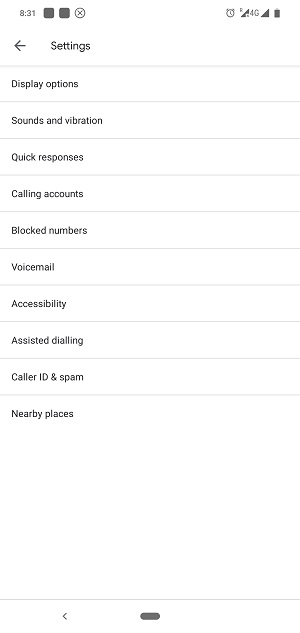
Step 4: In the next page, click on the ‘SIP accounts’.
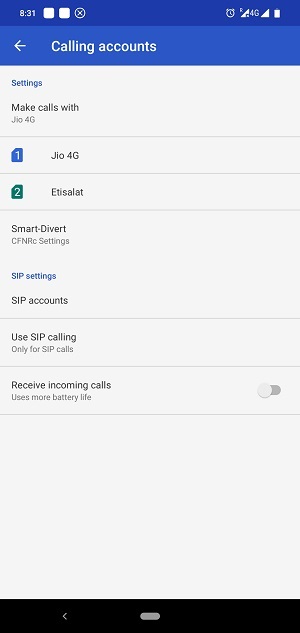
Step 5: In the next page, click on the ‘+’ button to add the SIP account.
Step 6: Next, you need to provide the username, password and server/proxy/domain address of your SIP account and click ‘SAVE’.
(Note: To use the service, you need to have an active SIP account)
Read: Official BSNL Wings Mobile Application to Make VoIP Calls Launched For Android
Step 7: Now, go back to the ‘Calling account’ section and enable ‘Receive incoming calls’ option, in order to receive the calls on your SIP number (if the SIP provider allows it).
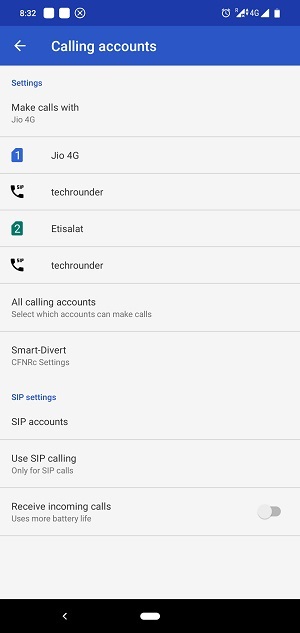
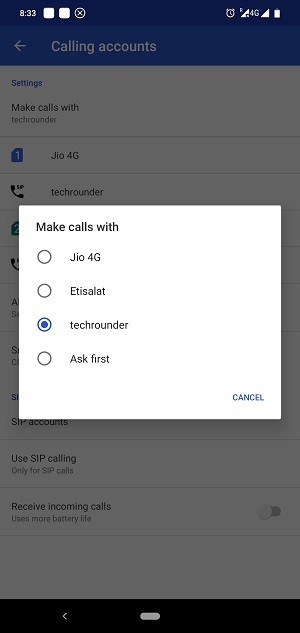
Step 8: Now, click on the ‘Make calls with’ section and select your preferred choice.
If you select the SIP account, then all the calls made from the dialer app will be made from the SIP account.
Read: How to Block Unwanted Calls Using Truecaller Mobile App
You can select ‘Ask first’ option here, once you initiate a call, a popup will ask you to select the calling account, either the SIM or the SIP account. You can choose the account for each calls in that way.




my Wave account no getting activated. Please help. It says user name and password wrong. Tried on Zoiper again no. On the ngn website it says no activated . Please help
In this case, you need to contact customer care. Please visit any nearest BSNL customer support centre.
Hi which version of phone dialer are you using no such option is showing on my device
It might not be available on some brands like Samsung as it is disabled on those phones.
I am using realme 7 pro
Hi Abrar,
On Realme, the SIP Configuration option is disabled.