Most of us are familiar with the popular Online chatting and messaging service WhatsApp. Well now how many have used WhatsApp Web version? you can install this app on your mobile device, tablets, iPads. But do you know you can also use the service of WhatsApp on your Laptop or PC?
So, today we will see how you can use your WhatsApp account on your PC or Laptop.
 Now, open the WhatsApp app that is installed on your phone. At the top-right corner, you can see three dots vertically aligned. Once you click on that line you will see many options. Now choose the option saying "WhatsApp Web". After clicking on it you can see the rear camera of your phone working. Simply, scan the QR code with the help of the camera.
Once scanned now you can access to the WhatsApp service on your Laptop or PC.
Now, open the WhatsApp app that is installed on your phone. At the top-right corner, you can see three dots vertically aligned. Once you click on that line you will see many options. Now choose the option saying "WhatsApp Web". After clicking on it you can see the rear camera of your phone working. Simply, scan the QR code with the help of the camera.
Once scanned now you can access to the WhatsApp service on your Laptop or PC.
What do you need?
Well, for using WhatsApp on your laptop or PC all you need is Laptop or a PC and a smartphone that has a rear camera and a WhatsApp account in it. In addition to this, you will also need an internet connection. Also, make sure that the Internet Connection should be active on the mobile phone. Apart, from this, you need to make sure that your phone is not running out of battery because if the phone gets off, you won't be able to use the service.How to connect to WhatsApp Web?
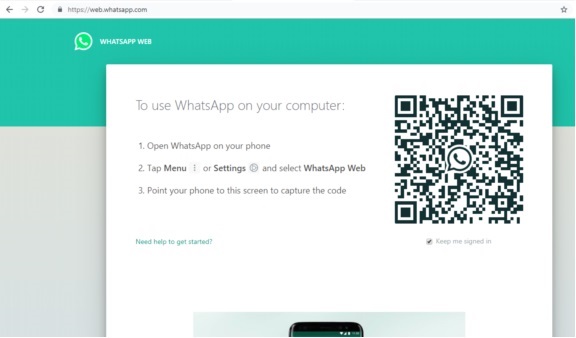
Now since you are all prepared let's move on the next step and see how you can connect to the service in a web browser. First of all, you need to open the WhatsApp web on your web browser. After that, you will see a screen containing a QR code like the one in the image given below.
Now, open the WhatsApp app that is installed on your phone. At the top-right corner, you can see three dots vertically aligned. Once you click on that line you will see many options. Now choose the option saying "WhatsApp Web". After clicking on it you can see the rear camera of your phone working. Simply, scan the QR code with the help of the camera.
Once scanned now you can access to the WhatsApp service on your Laptop or PC.