Vipin PG
Looking for UNetbootin Alternatives for Windows and Linux? Well, we have a lot of options stored for you. A popular and user-friendly utility, UNetbootin expands as a Universal Netboot Installer. This cross-platform utility is a go-to tool that helps in creating live bootable USB drives for various systems, including Windows and Linux. UNetbootin is a simple and straightforward utility that comes as a rescue for installing various Linux distributions or creating rescue disks. However, this open-source utility isn’t the only one for creating live bootable drives to install various Linux distributions and Windows. Thankfully, there are plenty of tools available that can do a similar job smoothly. Join us in this article as we explore the Best UNetbootin Alternatives For Windows and Linux. Although UNetbootin is a reliable choice, it comes with some limitation that makes users want to explore other choices. Also, due to its bit outdated interface (though user-friendly), individuals want to seek more reliable choices. Some users may encounter issues with compatibility, and UNetbootin may not always support the latest Linux distributions. So here we have the Best 8 UNetbootin Alternatives for Windows and Linux.
Best UNetbootin Alternatives For Windows and Linux
1. Rufus
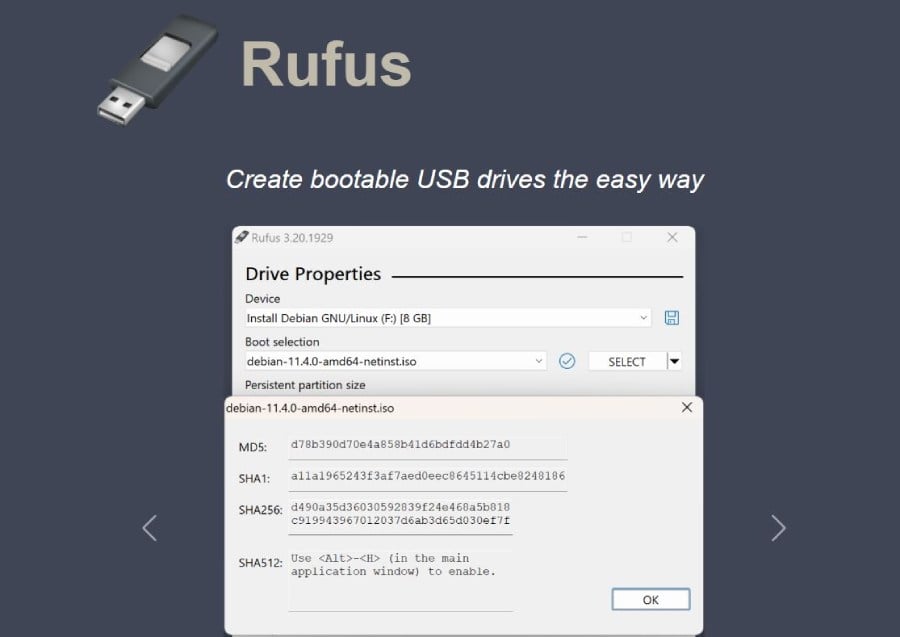 If you are looking for an UNetbootin alternative for Windows, Rufus is the best choice. This free and open-source portable application designed for Microsoft Windows is known for its lightweight nature. Rufus allows users to easily create and format bootable USB flash drives or Live USBs. It automatically detects the attached USB drive and thus simplifies the process of creating a bootable system. Speed and precision are undoubtedly the key advantages of using Rufus for any task. Users need not follow a traditional installation process; instead, a simple click allows them to easily download and run the application. Rufus is versatile and adaptable to different needs and supports FAT, FAT32, NTFS, exFAT, UDF, and ReFS. It is open source and is also accessible via code on GitHub. Rufus also offers extended support to bootable ISO images and thus allows users to create Live USB drives for Linux and Windows OS installations. It, in fact, offers support for raw disk images. Rufus is exclusively available for Windows 10/8/7 but Rufus 3.19 enables users to set up Windows 11 22H2 without a Microsoft account. In addition, it also offers service for Mac and Linux users under some limitations. Another drawback about Rufus is that it is designed for creating bootable drives for one distribution per USB. This can be a disadvantage for users who require multiple distributions on a single drive.
2. YUMI – Multiboot USB Creator
Another top UNetbootin alternative for Windows is YUMI, aka Your Universal Multiboot Installer. This multiboot USB creator is a versatile tool that comes in handy to make a multisystem bootable flash drive. By using YUMI, you can boot from USB your favorite Live Linux portable operating systems, antivirus utilities, disc cloning tools, diagnostic utilities, and different operating systems. Compared to other similar tools, YUMI consumes fewer device resources and thus is popular for its efficiency in terms of resource usage. It is, in fact, an excellent choice for creating a multiboot USB drive. Being a portable application, one can use YUMI directly from a USB stick without installing it before. This also makes it a user-friendly and convenient choice while looking for an UNetbootin alternative. YUMI allows users to create a multiboot USB drive and have multiple ISO files for various operating systems, utilities, and tools on it. This impressive USB creation isn’t just limited to operating systems, but users can also include a wide range of tools and utilities. It is available for free, and is a cost-effective solution for creating multiboot USB drives. This user-friendly, lightweight, and free tool offers incredible portability and versatility, thus making it a valuable resource for users who need to work with various ISO files on a single USB flash drive.
3. Universal USB Installer
Often referred to as UUI, the Universal USB Installer is a user-friendly tool designed for Windows and Linux. This tool allows users to create bootable USB drives with various Linux distributions and an ISO file. It allows users to choose from a selection of different Linux distributions, thus simplifying the process of creating bootable USB drives. UUI is popular for its user-friendly interface and thus is accessible to individuals with limited technical expertise as well. All you need to do is select the desired Linux distribution, provide the ISO file, choose their USB flash drive, and click on Install, then UUI will do the remaining task. Universal USB Installer allows users to format the USB drive to the FAT32 file system. This feature is helpful and recommended when creating bootable USB drives to ensure compatibility with a wide range of systems. Universal USB Installer is designed for Windows, but while using this tool, users can create bootable USB drives for Linux distributions. This straightforward and Windows-compatible solution also offers persistence if it’s supported by the chosen Linux distribution. It allows users to save their data and settings on the USB drive.
4. Deepin Boot Maker
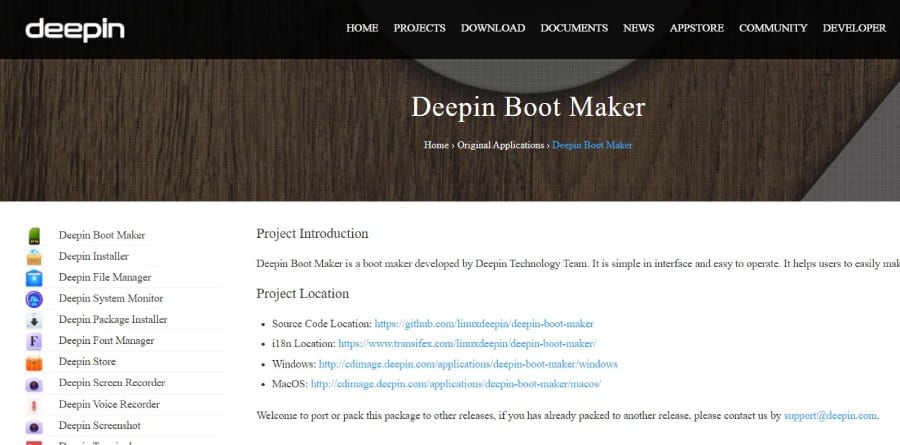 For Linux users, Deepin Boot Maker is an excellent UNetbootin alternative. This user-friendly software tool is designed to assist users in creating bootable USB drives and is associated with the Deepin Linux distribution. Deepin Boot Maker is versatile and accessible to a wide range of users and for multiple operating systems, including Windows, macOS, and Linux. Its simple and user-friendly interface is meant for intuitive and straightforward usage, thus assisting users of various technical expertise. Anyone can use it without any experience or extensive knowledge. Deepin Boot Maker is designed primarily for Deepin OS but can also be used to create bootable USB drives for various Linux distributions. When creating a bootable drive, all you need to do is select the ISO file of the desired Linux distribution, choose the target USB drive, and start the process. This easy and versatile tool for creating bootable USB drives is a practical choice.
5. LinuxLive USB Creator
LinuxLive USB Creator is another handy software designed for creating a bootable Live USB drive with a Linux operating system. This tool allows users to create a bootable drive for modern computers, especially the ones using Unified Extensible Firmware Interface. LinuxLive is known for making a portable Linux USB drive with a FAT file system. This feature adds to its advantage of carrying Linux OS with you and using it on different computers. The best part of LinuxLIve is its’ attractive and user-friendly interface designed with a step-by-step format. LinuxLive USB Creator allows users to run the Linux distribution directly within the software without rebooting their system. It allows users to create bootable Live USB drives for various Linux distributions, offering the option for persistent installations to save documents and system modifications. Using LinuxLive USB Creator users can also run Linux directly in Windows via Portable VirtualBox. LinuxLive USB Creator provides non-destructive installations as well. LinuxLive USB Creator is a free Windows program developed by Thibaut. However, it ceased receiving updates and support in 2015 and thus its compatibility with recent Linux distributions and hardware may be limited.
6. OpenSUSE image writer
Developed by the OpenSUSE community, OpenSUSE image writer is another popular UNetbootin alternative for Linux. This versatile and user-friendly graphical utility simplifies the process of creating bootable USB disks or drives. Its cross-platform compatibility offers accessibility to a wide range of users on both Windows and Linux-based platforms. This feature allows users with different operating systems to create bootable live USB drives with ease. OpenSUSE has an intuitive graphical interface, thus simplifying the process of creating bootable USB drives. The openSUSE Image Writer is a tool used for writing raw disk images & hybrid ISOs to USB keys. The OpenSUSE ensures that their utility aligns with the values and standards of the open-source community. Besides creating bootable USB drives with OpenSUSE, this tool can be used with a variety of Linux distributions. It is undoubtedly a versatile choice for users. When trying to create a bootable USB drive for installing or while rescuing your operating system, OpenSUSE imagewriter ensures keeping the process simple. With cross-platform compatibility, a user-friendly interface, and alignment with open-source principles, OpenSUSE is surely a top choice.
7. balenaEtcher
balenaEtcher is undoubtedly one of the most popular utilities available on the internet. This user-friendly open-source image burner, available for Windows, macOS, and Linux, stands out in the crowd. It is a convenient choice for users across different operating systems. Individuals use balenaEtcher either directly from a USB stick or a similar storage device. This eliminates the need for installation and adds to the user’s convenience. Also referred to as Etcher, this tool is lightweight and is known for its efficiency and low resource consumption. When using Etcher, it won’t use up excessive system resources, nor will it slow down the computer. Its’ GUI is designed with a modern yet simple look.. balenaEtcher is both free to use and open source, released under the Apache-2.0 license. For tasks like flashing or burning images onto USB drives and SD cards, this fast tool is a time-efficient choice. Although Etcher has some downsides, including it sends some data to Balena by default. However, this feature is hidden in the settings, and users can turn it off manually. Also, since it has a larger file size compared to Rufus and other competitors in the list, it can be a downside for some users.
8. Fedora Media Writer
Last but not least, on our list of Best UNetbootin Alternatives for Windows and Linux is Fedora Media Writer. Earlier, it was known as the Fedora Live USB Creator. This user-friendly tool designed for creating bootable USB drives is primarily tailored for Fedora distributions, but it also supports custom ISO images. The Fedora Media Writer offers cross-platform compatibility on various operating systems, including Mac OS X, Windows, and Linux. Fedora Media Writer accommodates custom ISO images and allows users to work with ISO, Raw.XZ image formats. One of its key features is the intuitive and aesthetically pleasing interface. The platform is easy to navigate, even for those with minimal tech expertise. It makes the process of creating bootable USB drives pretty straightforward. While users select the preferred image/ ISO, the Fedora Media Writer automatically identifies the attached USB drive, simplifying and streamlining the process. Fedora Media Writer is distributed under the GNU GPL license and is free and open-source. However, due to its primary on Fedora distributions, it may not be highly suitable for creating bootable drivers on other Linux distributions, including RedHat Enterprise Linux CentOS. Users looking for compatibility with a broader range of Linux distributions may need to explore alternative tools.
Wrapping Up
Overall, these were the top 8 Best UNetbootin Alternatives for Windows and Linux. If you are looking forward to leaving UNetbootin behind and like to pick another utility for creating bootable USB drives, choose one from the list above.