Vipin PG
If you’ve set up Claude Code to work in a project folder, there’s a good chance you’ve added a line like this to your settings, thinking it closes the door on your secrets:
{
  "permissions": {
    "deny": ["Read(./.env)"]
  }
}
It feels airtight. Claude asks permission before it reads or edits anything, you’ve explicitly denied the one file that matters most, and the settings file even lives in your git repo so the whole team benefits from it. Job done. Except it isn’t quite done. That rule works exactly as advertised for the situations most people picture , Claude trying to open .env directly, or running cat .env in the terminal. But there’s a gap in what it actually covers, and understanding that gap matters a lot more once Claude is running with broader permissions, like accept-edits mode or auto mode, on a machine that also holds your real credentials.
What a “Read” deny rule actually blocks
Claude Code’s permission system works in layers. Read-only actions like file reads normally don’t need your approval at all, Bash commands usually do, and file edits need approval until the session ends. When you add a deny rule, it’s checked before anything else: deny rules are evaluated first, then ask rules, then allow rules, and the first match wins. A rule like Read(./.env) covers two things:
- Claude’s own built-in tools , the Read tool, the Edit tool, Grep, and Glob
- A specific list of Bash commands Claude Code already knows are for reading files, such as
cat,head,tail, andsed
This is genuinely useful. It stops the everyday case: Claude deciding on its own to peek at a config file, or running an obvious command to print it. For most day-to-day work, this is exactly the protection people expect.
Where the gap actually is
The problem is what falls outside that list. Claude Code’s permission check works by recognizing the shape of a file-reading action , a specific tool call, or a specific command it already knows reads files. It doesn’t trace through what an arbitrary program does once it starts running. So if Claude writes a two-line Python script that opens .env using its own file-handling code and prints the contents, then runs that script with python script.py, nothing about that looks like a file read to Claude Code. From its point of view, it’s just executing a Bash command , the same category as running a test suite or a build script. The deny rule never gets a chance to fire, because the actual file access is happening inside a process Claude Code isn’t looking inside of. This isn’t a bug and it isn’t something Anthropic is hiding. Their documentation states this limitation plainly: permission rules on Read and Edit apply to Claude’s built-in tools and to the Bash commands Claude Code recognizes, and they explicitly do not extend to a Python or Node script that reads files on its own. If you want something that blocks every process regardless of how it reads a file, the documentation points to one specific feature: the sandbox. 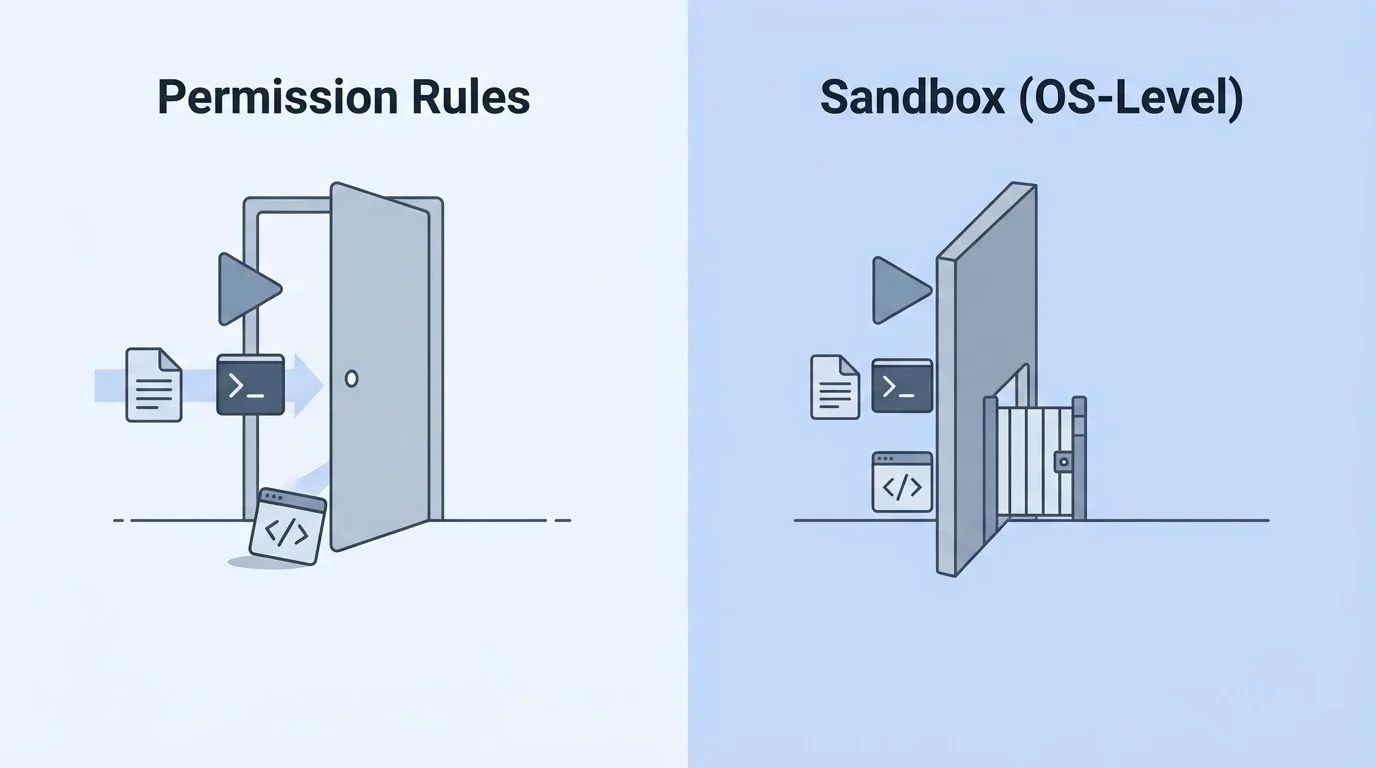
Why Claude Code is built this way
Permission rules and sandboxing are two different layers doing two different jobs, and Anthropic treats them that way on purpose. Permission rules are a fast, low-friction way to control which tool calls Claude is allowed to make , they’re enforced by Claude Code itself, not by the model, which is why prompt instructions can’t override them. But they were never meant to be a hard security boundary against arbitrary code execution. That’s what the sandbox is for. Sandboxing gives Claude Code actual operating-system-level enforcement: Seatbelt on macOS, and bubblewrap on Linux and WSL2 (native Windows isn’t supported , you’d need to run inside WSL2). Once it’s on, restrictions apply to every Bash command and everything that command spawns, including that Python script that would have slipped past a simple deny rule. This is the layer that actually closes the gap described above.
The catch: sandboxing doesn’t lock down reads by default
Here’s the part that surprises most people who turn sandboxing on expecting it to solve the problem completely: by default, the sandbox’s read policy is wide open. It restricts writes tightly , sandboxed commands can only write inside your working directory and a temp folder unless you say otherwise , but for reads, the default is access to almost the entire computer, except a small set of blocked locations. That default is permissive enough that it still allows reading files like ~/.aws/credentials and ~/.ssh/ unless you explicitly tell it not to. In other words: turning sandboxing on, by itself, does not automatically protect your `.env` file or your cloud credentials from that same subprocess trick. You still have to name the paths you want protected.
A configuration that actually closes the loop
Putting this together, a setup that meaningfully protects sensitive files needs three pieces working together: your existing permission deny rules (for the everyday case), the sandbox turned on (for OS-level enforcement), and explicit read protection inside the sandbox itself (because the sandbox’s defaults won’t do this for you).
{
  "permissions": {
    "deny": [
      "Read(./.env)",
      "Read(./.env.*)",
      "Read(./secrets/**)"
    ]
  },
  "sandbox": {
    "enabled": true,
    "allowUnsandboxedCommands": false,
    "filesystem": {
      "denyRead": ["~/.ssh", "~/.aws"]
    },
    "credentials": {
      "files": [
        { "path": "./.env", "mode": "deny" },
        { "path": "~/.aws/credentials", "mode": "deny" },
        { "path": "~/.ssh", "mode": "deny" }
      ]
    }
  }
}
Two settings above are doing quiet but important work:
allowUnsandboxedCommands: false, Without this, Claude Code includes a built-in fallback: if a command fails because the sandbox is blocking it, Claude Code may simply retry that command outside the sandbox instead. That’s a sensible default for usability, but it also means a command that’s failing specifically because it’s trying to touch something protected could quietly get a second attempt with no sandbox at all. Setting this tofalseremoves that fallback, so a blocked command stays blocked.- Listing paths under both
denyReadandcredentials.files, This is deliberate belt-and-suspenders. The dedicated credentials block exists specifically so credential protection doesn’t get lost or overridden in a larger settings file, while `denyRead` catches anything else you want off-limits.
If some of your tools genuinely need a credential to function , for example, a script that has to authenticate with an API , there’s also a masking option in Claude Code’s sandbox settings that substitutes a placeholder value for sandboxed commands and only swaps in the real credential when a request actually reaches an approved destination. It’s a more advanced setup, but worth knowing it exists if “deny everything” breaks something you actually need working.
What this still doesn’t cover
Even with all of the above in place, it’s worth being honest about the edges:
- The sandbox only wraps Bash commands and what they spawn. Claude’s built-in Read, Edit, and Write tools never run inside the sandbox at all , they rely on the permission rules covered earlier, which is exactly why both layers matter together.
- Native Windows isn’t supported. If you’re on Windows, you need WSL2 for any of this to apply.
- The sandbox’s network filtering checks the domain a request is going to, but by default it doesn’t inspect the actual encrypted traffic. Allowing a broad domain still means trusting that domain’s infrastructure isn’t misused to move data somewhere you didn’t intend.
- This is specific to Claude Code. If you’re also using Claude through MCP connectors, computer use, or other integrations, those have their own separate access boundaries and aren’t covered by the sandbox settings above.
The practical takeaway
None of this means permission deny rules are pointless , they’re still the right first step and they stop the most common accidental exposure. But they’re a set of guardrails around Claude’s own recognized actions, not a wall around your filesystem. If Claude has been given the ability to run arbitrary shell commands in a project that also has real credentials nearby , which describes most homelab and self-hosted setups , the deny rule alone is doing less than it looks like it’s doing. The short version to actually act on:
- Keep your existing
Read/Editdeny rules. They’re still useful. - Don’t treat them as a security boundary on their own , treat them as a courtesy check.
- Turn on Claude Code’s sandbox for any project where Claude can run commands and edit files freely, especially in accept-edits, auto, or bypass-permissions modes.
- Explicitly deny your sensitive paths inside the sandbox settings. Don’t assume the defaults protect them.
- Turn off the unsandboxed-retry fallback if you want the protection to actually hold under pressure.
Claude Code is being trusted with more autonomy every month , that’s the whole appeal of it. Understanding exactly where its guardrails stop, and where the operating system has to take over, is what keeps that autonomy from quietly becoming a liability.