 Vipin PG
Free VPN trials can bite. One page promises “7 days free,” but checkout still asks for a credit card or forces a phone detour. This 2026 desktop-first guide shows you how to dodge those traps.
You’ll see, line by line, how long each test runs on Windows 11 and the latest macOS builds, whether a card is stored, and what happens if you forget to cancel. We’ve gathered recent third-party speed tests, audit dates and cancellation steps so you can try two or three services without surprise charges.
Quick answer: today’s stand-out VPN trials
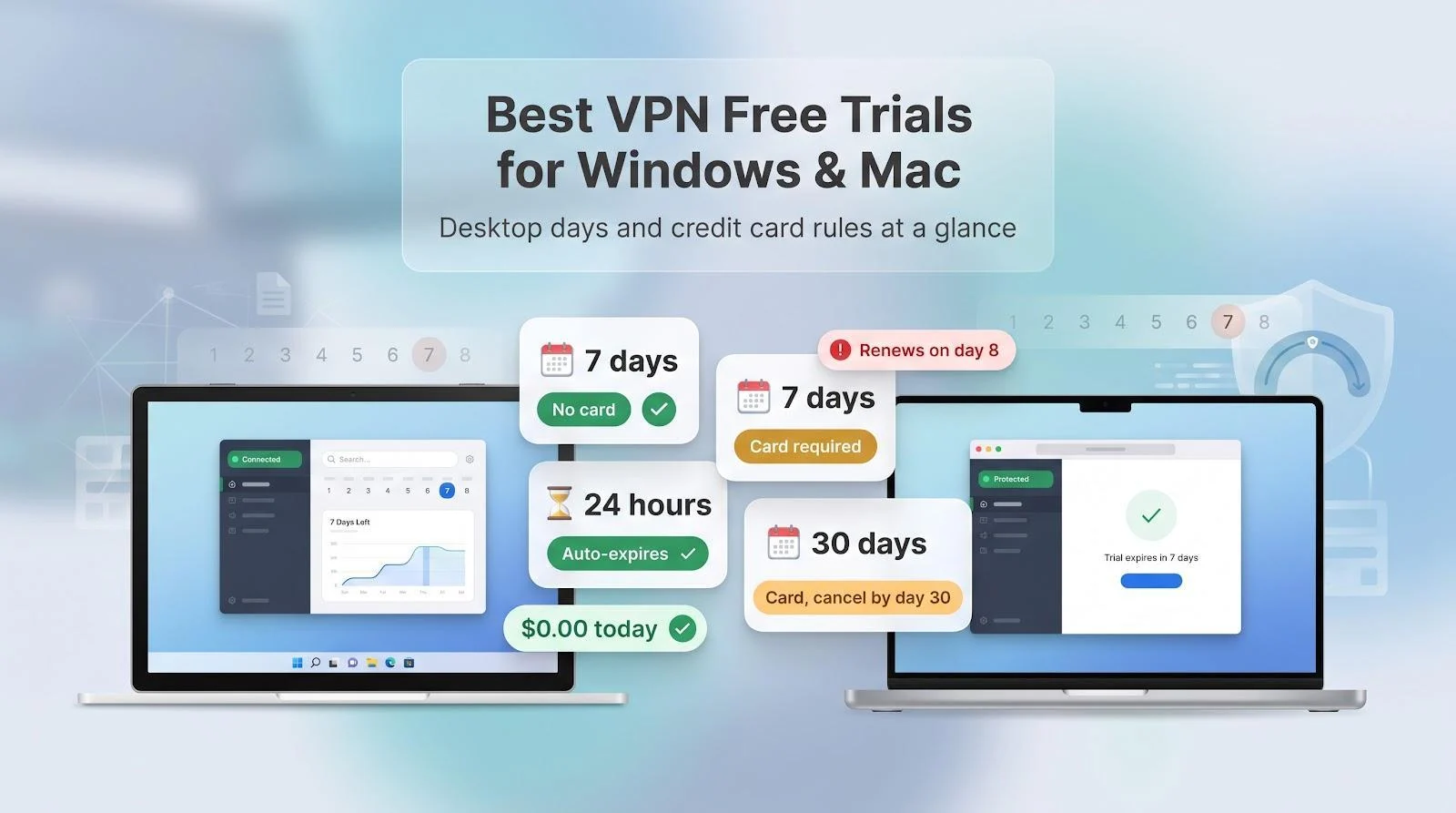
Short on time? Start with these desktop-ready options, then jump to the full rankings.
- Bitdefender: 7 Windows/macOS days, no card, auto-expires
- Surfshark: 7 days, card or PayPal required, renews on day 8
- CyberGhost: 24 hours, no payment, no cancellation step
- NordVPN (website route): 7 days in 15 eligible countries, card or PayPal, renews on day 8
- TorGuard: 7 Windows/macOS days, no credit card required, up to 8 connections
What counts as a real VPN free trial?
“Free” can mean different things on VPN landing pages. For this guide, a genuine desktop trial starts the moment you install a full Windows or macOS app and connect, with no coupons, no email loops and no payment today.
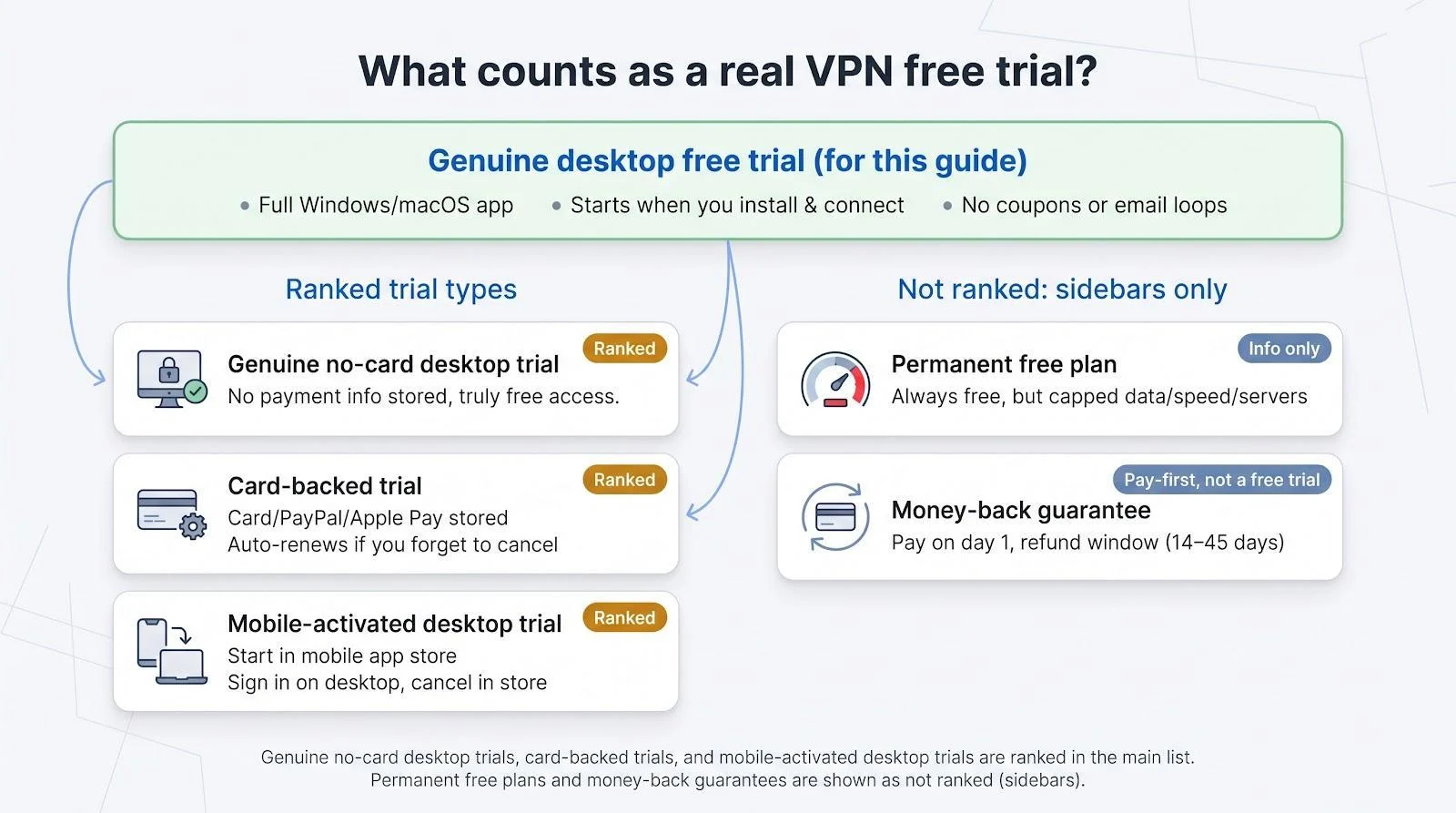
Everything else falls into four other offer types:
- Card-backed trial: the download costs nothing now, but checkout stores your card, PayPal or Apple Pay. If you forget to cancel, the plan auto-renews.
- Mobile-activated desktop trial: you tap “Start trial” in the iOS or Android store (which creates a subscription immediately) and then sign in on your PC or Mac. Cancellation must happen in the same store; deleting the desktop app does nothing.
- Permanent free plan: always free, but capped on speed, data or servers. Handy for casual tasks, not for testing the full premium tier.
- Money-back guarantee: you pay on day one and can ask for a refund (often 14-45 days). This is a pay-first refund window, not a free trial.
Genuine no-card desktop trials and the first two categories earn a ranking below. Permanent free plans and money-back guarantees sit in sidebars so you can compare them without mistaking them for true trials.
How we ranked the VPN trials
We scored each service on five weighted factors, then added the numbers for a total out of 100:
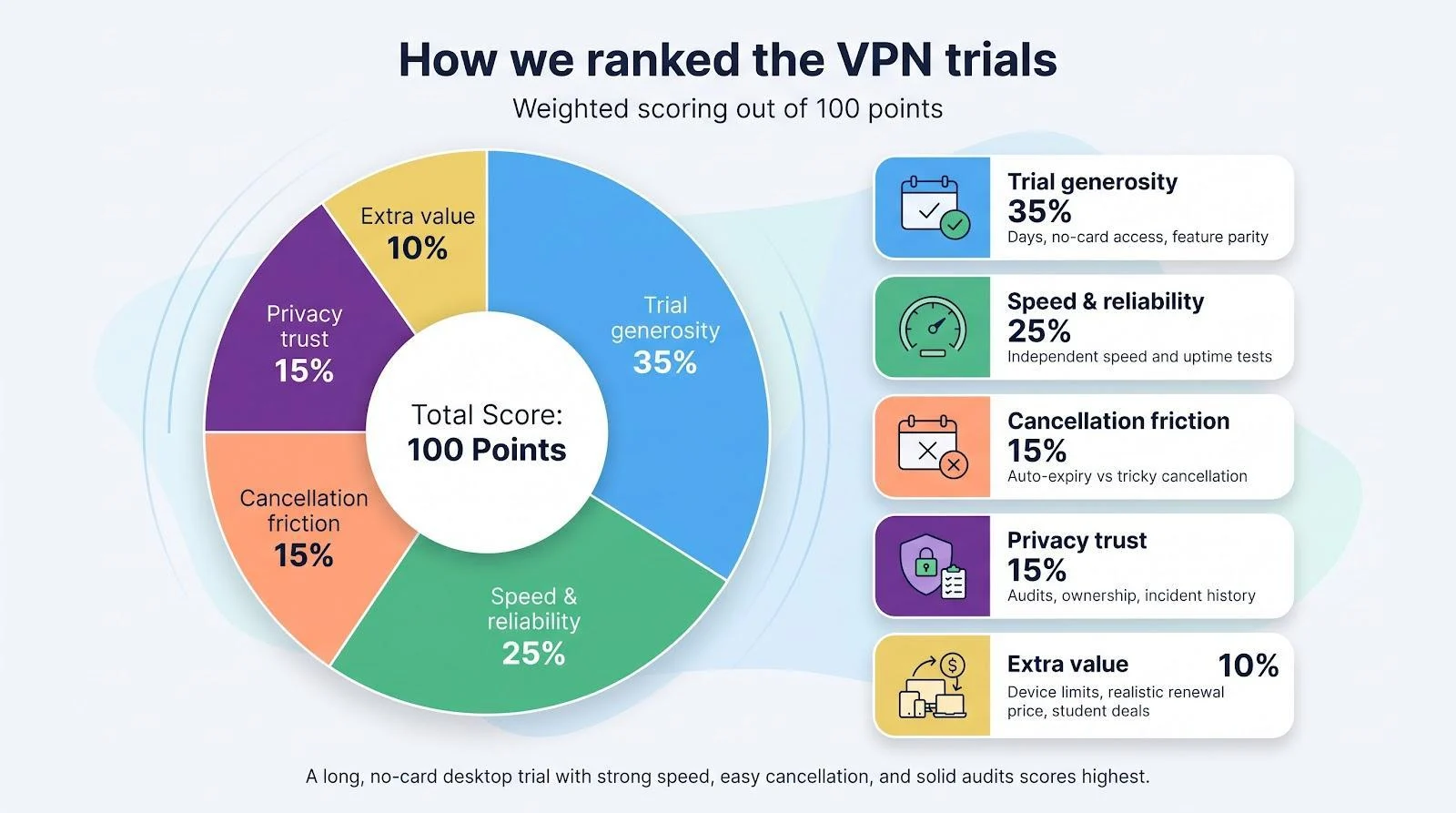
| Factor | Weight |
| Trial generosity (days, no-card access, feature parity) | 35% |
| Speed and reliability (independent tests only) | 25% |
| Cancellation friction (auto-expiry, self-service) | 15% |
| Privacy trust (audit depth, ownership, incidents) | 15% |
| Extra value (device limits, realistic renewal price, student deals) | 10% |
A week-long, no-card desktop trial with proven speed outranks a single-day test that rolls into a yearly bill. Providers also lose points if you must email support to cancel or if their last audit is stale.
These weights explain why TorGuard and Bitdefender lead the card-free trials, Surfshark edges paid-upfront rivals, and Norton’s 30-day window still matters despite the card step.
TorGuard: seven-day no-card trial for power users
| Trial facts | Details |
| Native desktop days | 7 |
| Payment needed | None (no credit card required) |
| Auto-renews | No card is stored; no charge unless you stay after day 7 |
| Devices during trial | 8 (Standard tier) |
TorGuard offers a seven-day free trial with no credit card required, and its trial page states there is no charge unless you stay after the seven days. The trial is not a cut-down tier: it includes unlimited speed and bandwidth, the full network of 3,000+ servers in 50+ countries and up to eight simultaneous connections, so you can test the Windows and macOS apps side by side.

Why power users still care:
- WireGuard, OpenVPN, OpenConnect and IKEv2 in one client
- Granular port-forwarding and stealth modes
- Eight simultaneous connections on the Standard plan
Performance holds up. Tom’s Guide recorded roughly 631 Mbps median throughput over WireGuard, leaving plenty of headroom for 4K streams and large game downloads.
Dedicated and residential IPs are available as add-ons rather than part of the base plan, so use the trial week to decide whether you need one for streaming or remote work. If you do not plan to stay, set a reminder before day 7 ends.
If you want the full power-user feature set without a card on file, start TorGuard’s VPN trial and run your own speed and leak tests during the week.
Bitdefender Premium VPN: easiest seven-day no-card trial
| Trial facts | Details |
| Native desktop days | 7 |
| Payment needed | None |
| Auto-renews | No (access stops on day 8) |
| Devices during trial | 10 |
Download the Windows or macOS client, click Start trial, and Bitdefender runs for seven days without touching your wallet. When day eight arrives, the tunnel disconnects with no pop-ups or surprise invoices.
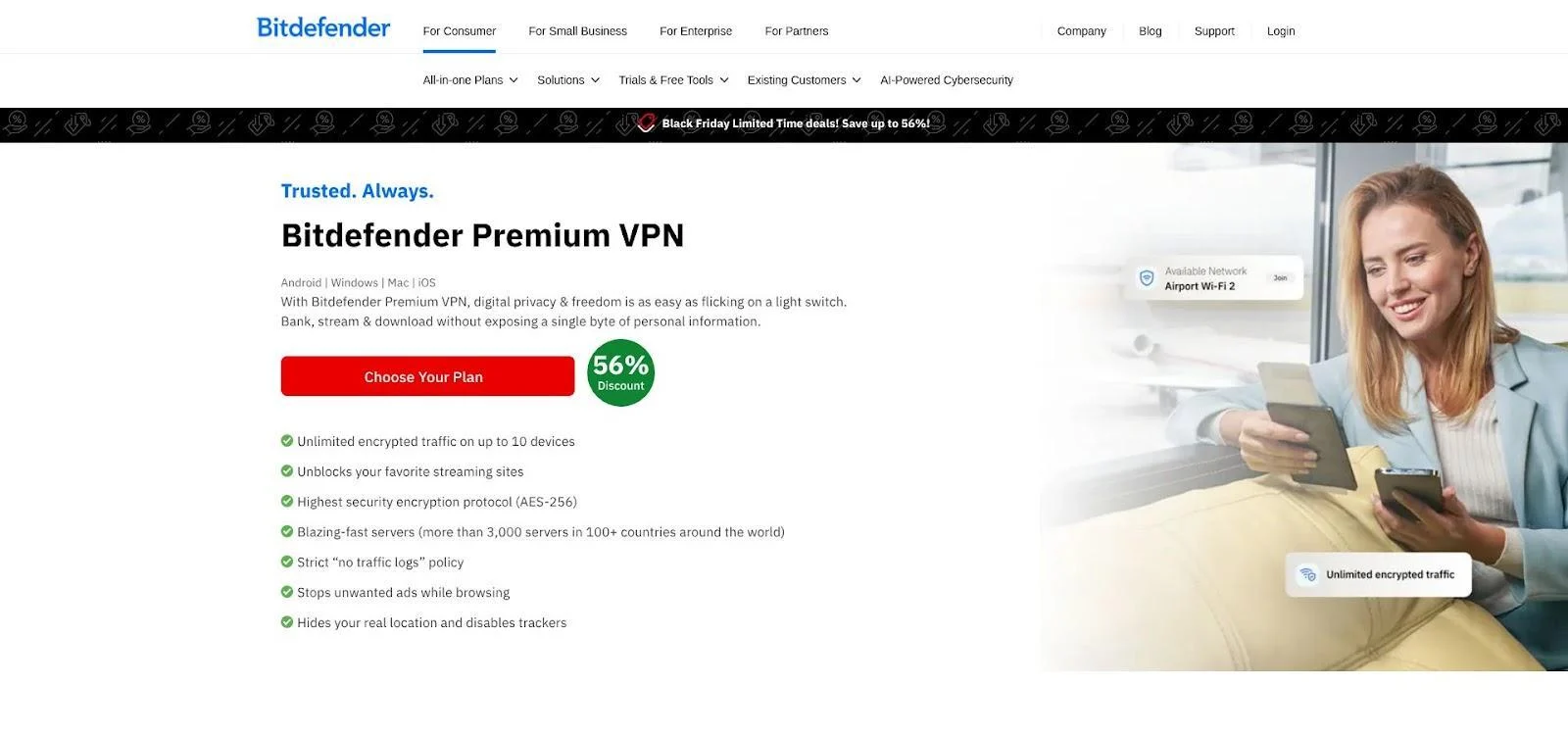
Bitdefender Premium VPN Desktop Trial Start Screen or Trial Page Screenshot
Why it stands out
- 3 000+ servers in 100 countries, selected automatically or via WireGuard for peak speed
- Wired measured only a 14% download drop on WireGuard, keeping 4K streaming smooth
- Bitdefender says a 2025 infrastructure review covered server deployment and log handling (auditor not named)
After the test, you can cover up to ten devices for about $35 in year one, backed by a 30-day money-back window. If you want a true “set it and forget it” desktop trial with no card and no cancellation, Bitdefender is the safest place to start.
Surfshark: most balanced seven-day desktop trial
| Trial facts | Details |
| Native desktop days | 7 |
| Payment needed | Card / PayPal / Apple Pay |
| Auto-renews | Yes, charge posts on day 8 |
| Devices during trial | 3 (unlimited after payment) |
Start on Surfshark’s website, choose a 12-month or 24-month plan, and you get seven days on Windows, macOS and mobile. A card or wallet token is stored, so set a reminder. The subscription converts on day 8.
Why consider it
- Speed: TechRadar’s lab tests measured more than 1 Gbps over WireGuard, enough for 4K streaming and large game downloads.
- Privacy: Surfshark has had its no-logs policy checked by an independent auditor.
- Features: Kill switch, Bypasser split tunnelling (now on macOS), MultiHop and an unlimited-device policy once you upgrade.
Cancellation is self-service: Dashboard → Subscriptions → Cancel. Access stays live until the seven-day clock ends, so you can cancel early and keep testing without risk. If you value raw speed plus audited privacy, and you do not mind a payment prompt, Surfshark is the most rounded week-long desktop trial on the market.
CyberGhost: fastest way to check compatibility
| Trial facts | Details |
| Native desktop days | 1 (24 h) |
| Payment needed | None |
| Auto-renews | No, access stops automatically |
| Devices during trial | 7 |
Download the Windows or macOS app, click Free trial, and you get 24 hours of full service with no forms and no credit card. When the clock reaches one day, the tunnel closes with no invoices or renewal risk.
Why it suits a quick test
- Servers in 100+ countries with streaming and P2P-labelled locations
- Automatic kill switch plus split tunnelling (richer on Windows than macOS)
- TechRadar measured about 1,480 Mbps over WireGuard on a nearby server, enough for 4K video and large backups
- Two Deloitte no-logs audits since 2022 and quarterly transparency reports
If CyberGhost fits, longer plans add a 45-day money-back guarantee, giving you six weeks of real-world use. If not, simply let the timer expire with no cancellation steps needed.
Norton VPN: longest mainstream trial with a safety net
| Trial facts | Details |
| Native desktop days | 30 |
| Payment needed | Card |
| Auto-renews | Yes, charge posts on day 31 |
| Refund window | 60 days on annual plans |
| Devices during trial | 10 |
Norton lets you road-test its Windows and macOS client for a full month. A card is stored at checkout, yet you have two cushions: cancel any time in My Norton → Billing before day 31, or let the annual plan start and still request a refund within 60 days.
What you can test
- Protocols: WireGuard or Norton’s Mimic, each with a kill switch, IP rotation and an optional double-VPN hop
- Speed: Tom’s Guide measured about 1 010 Mbps on a local WireGuard run and ≈782 Mbps on a U.S. to UK path, fast enough to forget the tunnel
- Coverage: Servers in roughly 100 countries, and major streaming libraries usually work without special servers
- Trust: A 2025 VerSprite no-logs assessment reviewed infrastructure and policies
Pricing note: first-year plans often sit near $30, but renewal jumps to $49.99 a year, so set a calendar alert.
Choose Norton if you need several weeks to test every work-day scenario and want a generous refund window in case you change your mind.
NordVPN: premium features, selective seven-day trial
| Trial facts | Details |
| Native desktop days | 7 |
| Payment needed | Card / PayPal |
| Auto-renews | Yes, converts to a 27-month term (about $189) on day 8 |
| Eligible plans | 1-year or 2-year Plus/Ultimate tiers; Basic does not qualify |
| Devices during trial | 10 |
| Availability | 15 supported countries (including United States) |
Start the sign-up on NordVPN’s website, choose a 1-year or 2-year Plus or Ultimate plan, and you get seven days on Windows or macOS. A payment method is stored, so set a reminder. The subscription rolls into a 27-month term on day 8.
Why it excels
- Speed: Tom’s Guide measured about 1.25 Gbps on a local NordLynx run and about 626 Mbps from the UK to a U.S. server.
- Security extras: Double VPN, Onion over VPN, obfuscated servers and Meshnet device routing.
- Trust: Repeated independent no-logs audits since 2018, most recently by Deloitte, RAM-only servers and open-sourced NordLynx code.
Cancellation is self-service: Nord Account → Billing → Cancel automatic payments. Access continues until the seven-day clock ends, so you can cancel immediately and still enjoy the full week.
Choose NordVPN if you want every security add-on and top-tier speed, and you are comfortable with an upfront payment method plus a higher-priced plan. Double-check that your country appears on the eligibility list before you sign up.
VPNUK: thirty days to tinker, no card required
| Trial facts | Details |
| Native desktop days | 30 |
| Payment needed | None |
| Auto-renews | No, account closes automatically |
| Devices during trial | 100 (shared-IP plan) |
| Locations | About 30 |
Sign up with an email, install the Windows app and VPNUK lets you explore its network for a full month without entering payment details. When day 31 arrives, the account simply expires.
Things to know
- Flexibility: WireGuard, OpenVPN and IKEv2 in the Windows client; Mac users import profiles manually.
- Scale: About 30 server locations, fine for browsing but not for globe-spanning speed tests. No independent benchmarks or no-logs audit are published, and the UK jurisdiction may concern privacy purists.
- Device cap: The shared-IP plan protects up to 100 devices, handy for large households or small offices. Dedicated and residential IP extras cost more.
VPNUK lacks polish and raw speed, yet its zero-card, 30-day window is ideal for testing port-forward rules or dedicated-IP workflows without financial risk.
DuckDuckGo VPN: privacy bundle with a seven-day test
| Trial facts | Details |
| Native desktop days | 7 |
| Payment needed | Card (inside DuckDuckGo browser) |
| Auto-renews | Yes, $9.99 per month or $99.99 per year if not cancelled |
| Devices during trial | 5 |
| Server locations | 31 countries |
Activate the VPN from inside the DuckDuckGo browser, add a payment method, and you get seven days across Windows, macOS, iOS and Android. The service relies solely on WireGuard, which keeps setup simple but removes legacy-protocol fallbacks.
Why pick it
- Privacy first: A 2026 Securitum audit of live systems and source code confirmed no identifying logs.
- Solid everyday speed: Macworld recorded about a 12% download dip on nearby tests, which is imperceptible for HD streaming and web work.
- Safety net: If the tunnel drops, DuckDuckGo’s browser extension blocks traffic until it reconnects, preventing accidental leaks.
After the trial, pricing is straightforward: $9.99 per month or $99.99 per year, cancelled in two clicks via Account → Subscription. Choose DuckDuckGo if you want search, tracker blocking and a no-logs VPN in one audited bundle, and you can live with a smaller 31-country network.
Private Internet Access: mobile route to an unlimited-device desktop
| Trial facts | Details |
| Native desktop days | 7 (mobile-store activation) |
| Payment needed | Active Apple or Google billing profile |
| Auto-renews | Yes, store charges on day 8 |
| Devices during trial | Unlimited |
Start the trial in the Apple App Store or Google Play to get seven days. The store instantly creates a subscription, and your credentials unlock the full Windows and macOS clients within seconds.
Key points
- Open source and audits: Desktop and mobile apps are open source, and PIA has passed three Deloitte no-logs audits plus court challenges that found no user data.
- Performance: TechRadar measured about 419 Mbps on a local WireGuard run, ample for 4K streaming and large backups.
- Features: WireGuard and OpenVPN, a reliable kill switch, split tunnelling, and true unlimited device support.
Remember: cancellation must happen in the same store (iOS Settings → Subscriptions or Google Play → Payments & Subscriptions → Cancel). Deleting the desktop app does not stop billing, so set a reminder before the charge date.
Choose PIA if you have a gadget-packed household and value open-source transparency, and you are comfortable managing the trial (and any future billing) through a mobile store.
X-VPN: store-based trial with fine print worth reading
| Trial facts | Details |
| Native desktop days | 7 |
| Payment needed | “No card” claim varies by store; Apple and Google require a billing profile |
| Auto-renews | Yes, price depends on store (about $72 per year in app) |
| Devices during trial | 5 |
| Server footprint | 8,000+ servers |
Install X-VPN from the App Store or Google Play and you will see “$0 today,” but the store still insists on an active payment profile. Some users report a similar prompt in the Microsoft Store, while others complete that route with no payment on file. Double-check the final screen before you tap Get.
Why you might try it
- Network size: 8,000+ servers and WireGuard, OpenVPN plus the proprietary Everest protocol.
- Audit: X-VPN cites a no-logs assurance report, but the auditor is unnamed and the report is gated.
- Unblocking: Community tests praise X-VPN for bypassing strict streaming catalog blocks and workplace firewalls.
Caveats
- Performance: One independent review measured more than 40% download loss on an Australian test server, slower than Surfshark or Nord.
- Pricing: The in-app annual plan sits around $72, while the website sells a two-year plan for $69.99. Purchases and cancellations must occur in the same store; website support cannot modify Apple or Google subscriptions.
- Trust: Audit transparency is limited (unnamed firm, gated PDF) and Trustpilot hovers near 3.8 out of 5.
Pick X-VPN if you value server breadth and stubborn-site unblocking and you are willing to scrutinize the “$0 today” line before installing. Otherwise, a clearer no-card trial higher on this list may suit you better.
ExpressVPN: seven-day taste for first-time users
| Trial facts | Details |
| Native desktop days | 7 (mobile-store activation) |
| Payment needed | Active Apple or Google billing profile |
| Auto-renews | Yes, store charges on day 8 (about $12.95 per month in most regions) |
| Devices during trial | 10 to 14 (plan dependent) |
Start the trial in the iOS or Android store and you get seven days of access. The same credentials unlock the Windows and macOS apps. Because the subscription lives in the store, remember to cancel there before the seven-day mark.
Why try it
- Protocols: Lightway and WireGuard by default, plus a Network Lock kill switch on all desktop builds.
- Speed: TechRadar measured about 967 Mbps on WireGuard and about 1,177 Mbps with Lightway Turbo (Windows only), fast enough to saturate most fiber lines.
- Trust: More than 20 independent audits, including a 2025 KPMG review, and RAM-only servers that wipe data on every reboot. Lightway code is open source.
Caveats
- Billing starts automatically if you miss the cancellation window.
- Store purchases do not include ExpressVPN’s 30-day website money-back guarantee.
Use ExpressVPN to sample a polished, big-brand client. Set a six-day reminder so the quick trial stays truly free.
Avast Premium VPN: longest trial, largest trust penalty
| Trial facts | Details |
| Native desktop days | 60 |
| Payment needed | Card |
| Auto-renews | Yes, charge posts on day 61 (about $59.88 per year in most regions) |
| Devices during trial | 10 |
| Server footprint | 100+ countries |
Avast offers the lengthiest mainstream desktop trial: two full months on Windows or macOS before your card is charged. You can stream, torrent and test split tunnelling across up to ten devices.
Performance and features
- Kill switch, split tunnelling, IP rotation and an optional double-VPN hop
- Gizmodo measured roughly 22% average download loss, middle of the pack yet smooth for 4K video
Why the low ranking
In June 2024 the U.S. FTC fined Avast $16.5 million and barred the company from selling browsing data for advertising. The order did not target Avast Premium VPN specifically, but it raises fair questions about the brand’s data culture. Avast has yet to publish an independent no-logs audit to rebuild trust.
If you still want to trial the software, treat the 60 days as a convenience buffer. Set a reminder for day 59 and cancel via Avast Account → Subscriptions before auto-renew kicks in. Use the window to decide whether the long test period outweighs the unresolved privacy concerns.
Other VPN trials we considered
| Provider | Desktop days | Card needed | Key issue | Status |
| Trust.Zone | 3 | None | One connection, first 1,000 users per month, audit “coming soon” | Backup |
| F-Secure | 5 or 30 (varies by page) | Unclear | Conflicting help pages (pay first versus no card) | Needs re-test |
| AVG Secure VPN | 60 | Card (not always shown) | Checkout flow changes day to day; sibling of Avast | Backup |
| VPN Unlimited | 7 | None | Lifetime-plan backlash, no audit | Backup |
We revisit these services after each publishing cycle. Any that fix checkout clarity or publish a no-logs audit can move into the main rankings.
Comparison table: desktop days and card rules at a glance
| Provider | Native desktop days | Effective desktop days* | Payment needed | Auto-renews? | First charge if forgotten | Device cap |
| Bitdefender Premium VPN | 7 | 7 | None | No | None | 10 |
| VPNUK | 30 | 30 | None | No | None | 100 |
| CyberGhost | 1 | 1 | None | No | None | 7 |
| TorGuard | 7 | 7 | None | No | None | 8 |
| Surfshark | 7 | 7 | Card / PayPal / Apple Pay | Yes | $67.23 on day 8 (2-year plan) | 3 |
| NordVPN (website) | 7 | 7 | Card / PayPal | Yes | $188.73 on day 8 | 10 |
| DuckDuckGo VPN | 7 | 7 | Card | Yes | $9.99 on day 8 | 5 |
| Private Internet Access | 7 | 7 | App-store profile | Yes | Store price on day 8 | Unlimited |
| X-VPN | 7 | 7 | Store dependent | Route dependent | $71.99 per year (App Store) | 5 |
| Norton VPN | 30 | 30 | Card | Yes | $29.99 on day 31 | 10 |
| ExpressVPN | 7 | 7 | App-store profile | Yes | $12.95 on day 8 | 10 to 14 |
| Avast Premium VPN | 60 | 60 | Card | Yes | $59.88 on day 61 | 10 |
*Effective desktop days = native days minus any required mobile activation delay.
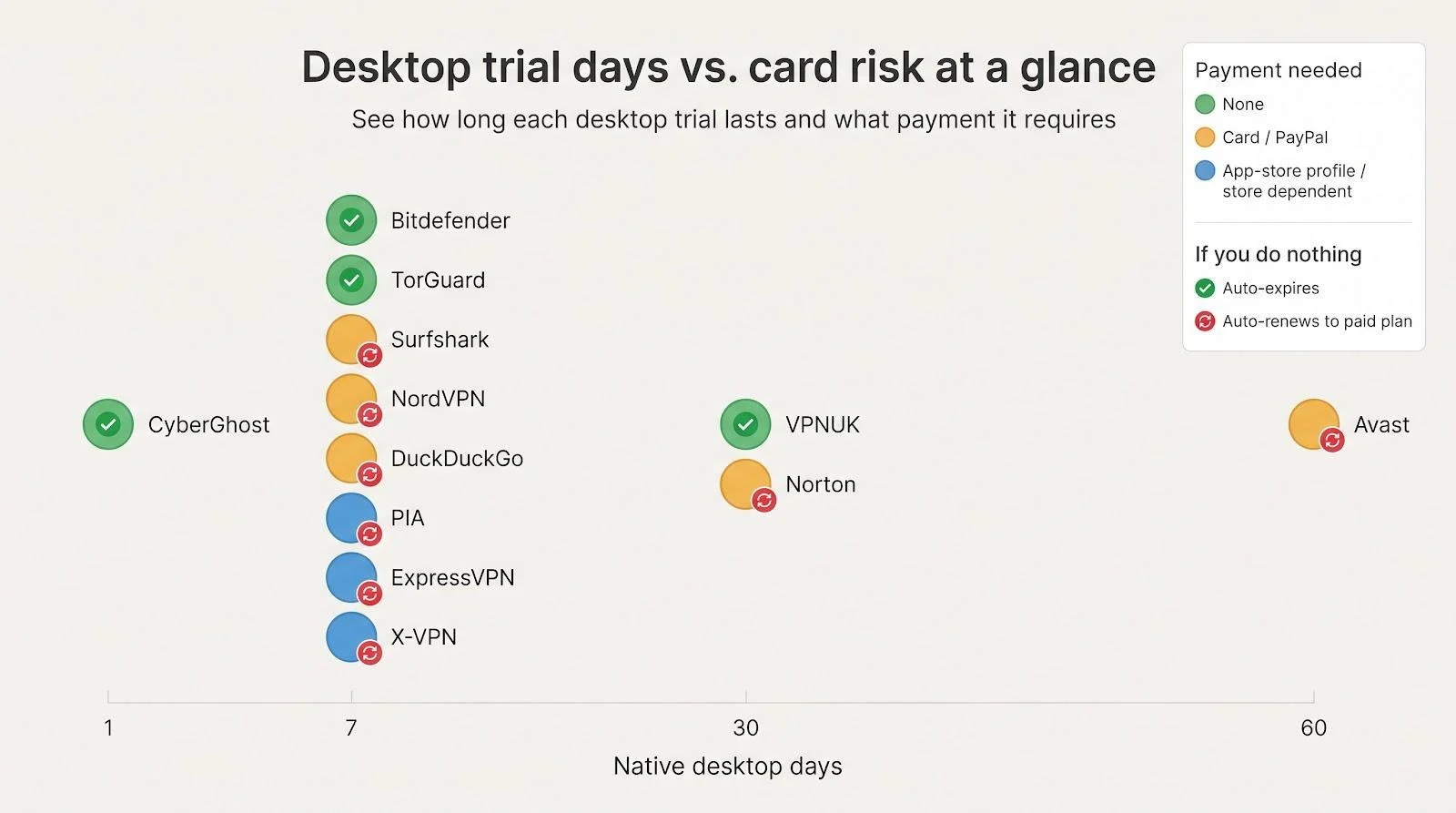
Start with the row that matches your payment risk comfort level, then jump to each in-depth review for speed, privacy and cancellation details.
Comparison table: first charge and cancellation risk
| Provider | Charged today? | First charge if you do nothing | Billing term | Where to cancel | Access after cancel? |
| Bitdefender Premium VPN | None | Auto-expires | None | Not required | None |
| VPNUK | None | Auto-expires | None | Not required | None |
| CyberGhost | None | Auto-expires | None | Not required | None |
| TorGuard | None | Nothing (no card on file) | Monthly, only if you stay | Not required | None |
| Surfshark | No | $67.23 on day 8 (2-year Starter) | 24 months + 3 | Dashboard → Subscriptions | Live to day 7 |
| NordVPN (website) | No | $188.73 on day 8 | 27-month | Nord Account → Billing | Live to day 7 |
| DuckDuckGo VPN | No | $9.99 on day 8 | Monthly | Browser → Subscription | Live to day 7 |
| Private Internet Access | No | Store price on day 8 | Monthly (store) | iOS / Android → Subscriptions | Live to end |
| X-VPN‡ | No | $71.99 per year on day 8 | Yearly (store) | Same store page | Live to day 7 |
| Norton VPN | No | $29.99 on day 31 | Yearly | My Norton → Billing | Live to day 30 |
| ExpressVPN | No | $12.95 on day 8 | Monthly (store) | iOS / Android → Subscriptions | Live to day 7 |
| Avast Premium VPN | No | $59.88 on day 61 | Yearly | Avast Account → Subscriptions | Live to day 60 |
‡ Price shown for App Store route; website bundles differ.
Auto-expiry matters more than “no card.” Only Bitdefender, TorGuard, VPNUK and CyberGhost end without user action. Every other trial converts to a paid plan unless you cancel through the same channel you used to sign up.
Comparison table: performance and trust factors
| Provider | Benchmark speed† | Latest no-logs audit (year) | Auditor named? | Open-source client? | Trustpilot score | Ownership |
| Bitdefender | 14% loss | 2025 infra review | No | No | 4.4 | Independent |
| VPNUK | n/a | None | None | No | 4.7 (26) | Independent |
| CyberGhost | 1,480 Mbps | 2024 Deloitte | Yes | No | 4.0 | Kape |
| TorGuard | 631 Mbps | None | None | No | 4.3 | Independent |
| Surfshark | 1,021 Mbps | Independent audit | Yes | Partially (browser) | 4.3 | Nord Security |
| NordVPN | 1 249 Mbps | 2025 Deloitte | Yes | Partially (NordLynx) | 4.2 | Nord Security |
| DuckDuckGo | 12% loss | 2026 Securitum | Yes | Browser + apps | 2.5* | Independent |
| Private Internet Access | 419 Mbps | 2025 Deloitte | Yes | Yes | 4.2 | Kape |
| X-VPN | 40%+ loss | Unverified (gated) | No | No | 3.8 | Independent |
| Norton VPN | 1 010 Mbps | 2025 VerSprite | Yes | No | 4.7 | Gen Digital |
| ExpressVPN | 1 177 Mbps | 2025 KPMG | Yes | Lightway | 4.4 | Kape |
| Avast Premium VPN | 22% loss | None | None | No | 4.4 | Gen Digital |
† Fastest recent third-party lab result; methodologies differ, so use numbers directionally.
- DuckDuckGo’s Trustpilot reflects its wider search and browser business, not just the VPN.
Only about a third of providers publish fully open-source desktop apps, and VPNUK still lacks any modern benchmark or audit. Avast shows middling speed and remains under an FTC order from June 2024 that bans selling browsing data for advertising.
Raw speed can impress, but audit depth often matters more over time. Weigh both columns before you click Download.
Windows vs Mac: what to check before you click Connect
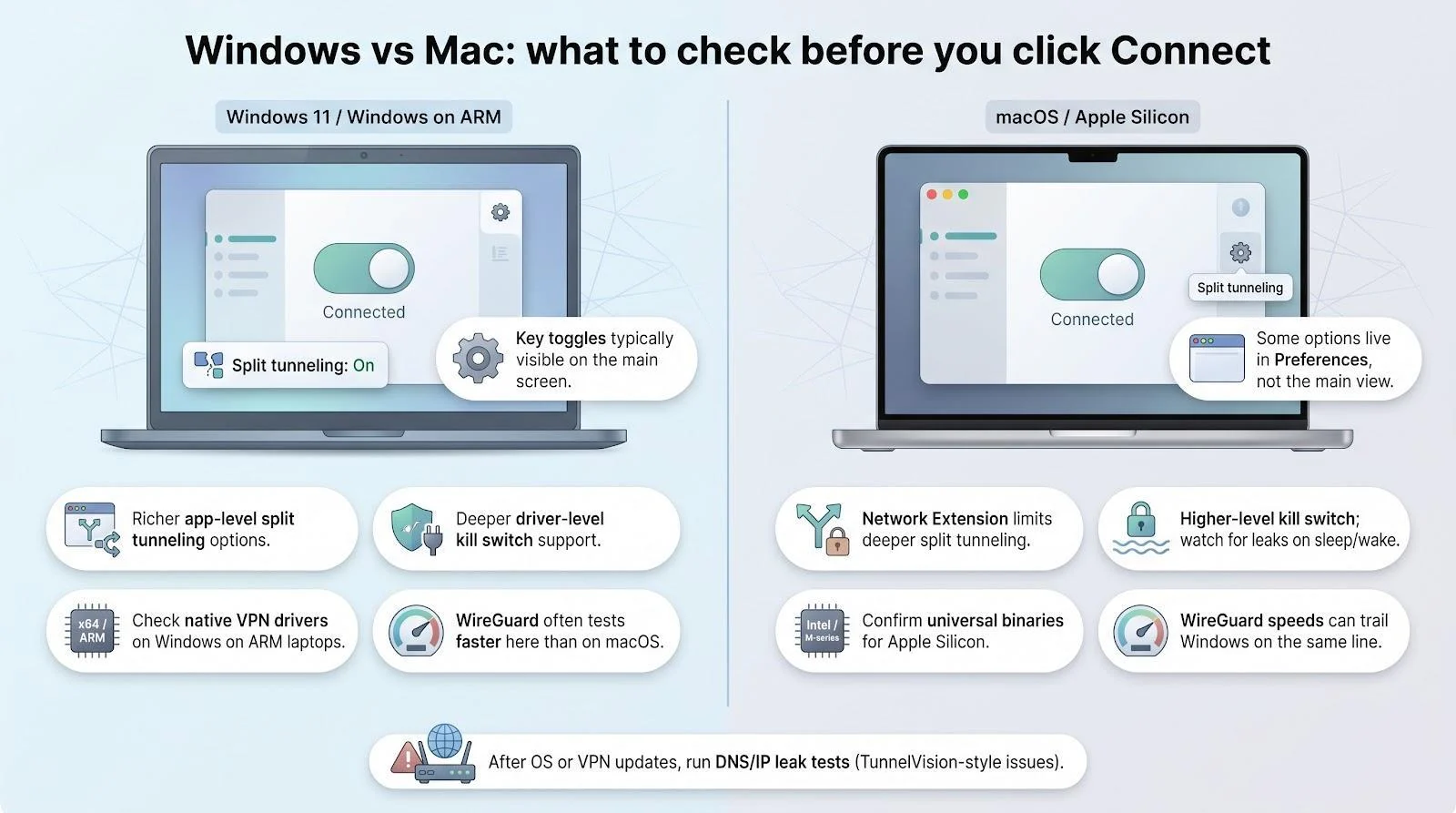
- Split tunneling
- Windows 11 usually offers app-level or even Microsoft Store-app exclusions (for example, Surfshark Bypasser and PIA).
- macOS Network Extension limits deeper hooks, and NordVPN still lacks app-level split tunneling here.
- Kill switch depth
- Windows clients can drop traffic at the driver layer.
- Many Mac apps rely on higher-level processes that may leak packets during sleep and wake unless you enable “system-wide” mode.
- Processor support
- Windows on ARM: check for native drivers if you use a Surface Pro X or ThinkPad X13 s. Bitdefender, Surfshark and ExpressVPN already ship them.
- Apple Silicon: most majors now provide universal binaries, and performance is near native on M-series chips.
- Performance quirks
- CyberGhost and others often post slightly lower WireGuard speeds on macOS than Windows because of Apple’s Network Extension sandbox.
- Emulated x86 VPN drivers on ARM64 Windows can sap battery life and throughput.
- Interface differences
- Surfshark’s Bypasser toggle sits front and center on Windows but hides under Preferences → Advanced on macOS.
- DuckDuckGo’s browser-integrated VPN shows per-site block stats only on Mac.
- Recent security fixes
- TunnelVision (CVE-2024-3661) showed DHCP routes could bypass a VPN. Vendors patched at different speeds, so run a quick DNS/IP leak test after each OS update.
Quick tip: open the provider’s release notes for your exact build (Windows 11, Windows on ARM, Intel Mac or Apple Silicon) before you install. A minute of homework now prevents the “Where’s my split-tunneling switch?” scramble later.
How to test a VPN during a short trial
Before you start
- Write your task list: note every job the VPN must tackle (e.g., RDP to the office, 4K Netflix UK, weekly torrent, low-latency Valorant).
- Record a baseline: run a speed test without the VPN and grab a leak-test screenshot (IP, DNS, WebRTC).
- Set two reminders: one halfway through the trial and one 24 h before the first charge; paste the cancellation-page URL into each alert.
With goals, benchmarks and safety nets ready, click Connect and collect data instead of scrambling at the last minute.
Ethical and legal trial “hacks”
- Stay inside published rules: starting a mobile trial, signing in on desktop and cancelling right away is acceptable if the provider or app-store FAQ allows it. Apple and Google usually keep access live until the timer ends.
- Use calendar alerts, not disposable cards: two reminders beat a lost prepaid card and keep your payment history clean for future discounts.
- Treat refund windows as a safety net, not a habit: repeated 30-day refund requests can flag your account and void future guarantees.
- Skip outright abuse: providers fingerprint devices and share fraud data. Cycling email aliases or spoofing hardware IDs can trigger bans across sibling brands (for example, ExpressVPN, PIA, CyberGhost).
- Remember local laws still apply: a VPN masks traffic from your ISP but does not override copyright, gambling or age-restriction rules.
Free plans instead of trials
Permanent free tiers never bill you, but they trim speed, data or servers. Use them for light browsing or airport Wi-Fi, not for sustained streaming or large torrents.
| Provider | Data cap | Locations | Devices | Major limits |
| Proton VPN Free | Unlimited | 10 | 1 | Blocks streaming and P2P |
| hide.me Free | Unlimited | 8 | 1 | Basic speeds; no signup needed |
| Windscribe Free | 10 GB per month (2 GB with no email) | 10 | Unlimited* | Ads and some servers locked |
| PrivadoVPN Free | 10 GB per month + 1 Mbps Lite | 12 | 1 | Speed throttles after cap |
| Malwarebytes Free VPN | 10 GB total | 5 | 5 | Sharp slowdown after cap |
*Windscribe counts devices by fair-use policy rather than a hard cap.
These plans are handy backups when your main VPN hiccups, but their caps and restricted locations make them poor substitutes for a full-power, time-limited trial.
Which VPN trial should you start with?
If you want a week on desktop with no card on file, start with Bitdefender or TorGuard; TorGuard adds port forwarding, stealth modes and eight connections for power users. Pick Surfshark or NordVPN if you are happy to store a payment method, CyberGhost for a one-day compatibility check, and Norton or Avast only if you need a longer window and will set a cancellation reminder. Whichever you choose, record a baseline speed and leak test first, so the trial ends with an answer rather than a bill.