Vipin PG
If you’ve started using skill files in an AI coding tool, you’ve probably run into a moment where you write a perfectly good SKILL.md, the agent doesn’t use it, and you’re left wondering if the feature is broken or if you set it up wrong. This comes up a lot with Google Antigravity, and the short answer is: it’s not really “broken,” but it is genuinely more confusing to set up correctly than in Claude Code, where the same idea originated. Here’s what’s actually going on, based on Google’s own documentation, a real bug report from developers, and independent testing of where each tool actually looks for these files.
1. What SKILL.md Actually Is
A skill is just a folder with a file called SKILL.md inside it, containing plain instructions the agent should follow for a specific kind of task , things like “here’s how our database schema works” or “here’s our code review checklist.” The idea started with Claude Code, and Anthropic later opened up the format so other tools could use it too. That’s why you’ll now see the same SKILL.md structure supported across Claude Code, Google Antigravity, and OpenAI’s Codex, among others. This matters because it means you can, in theory, write one skill file and reuse it across tools instead of maintaining separate versions for each one. In practice, whether that skill actually gets picked up depends heavily on which tool you’re using.
2. How Skill Loading Is Supposed to Work
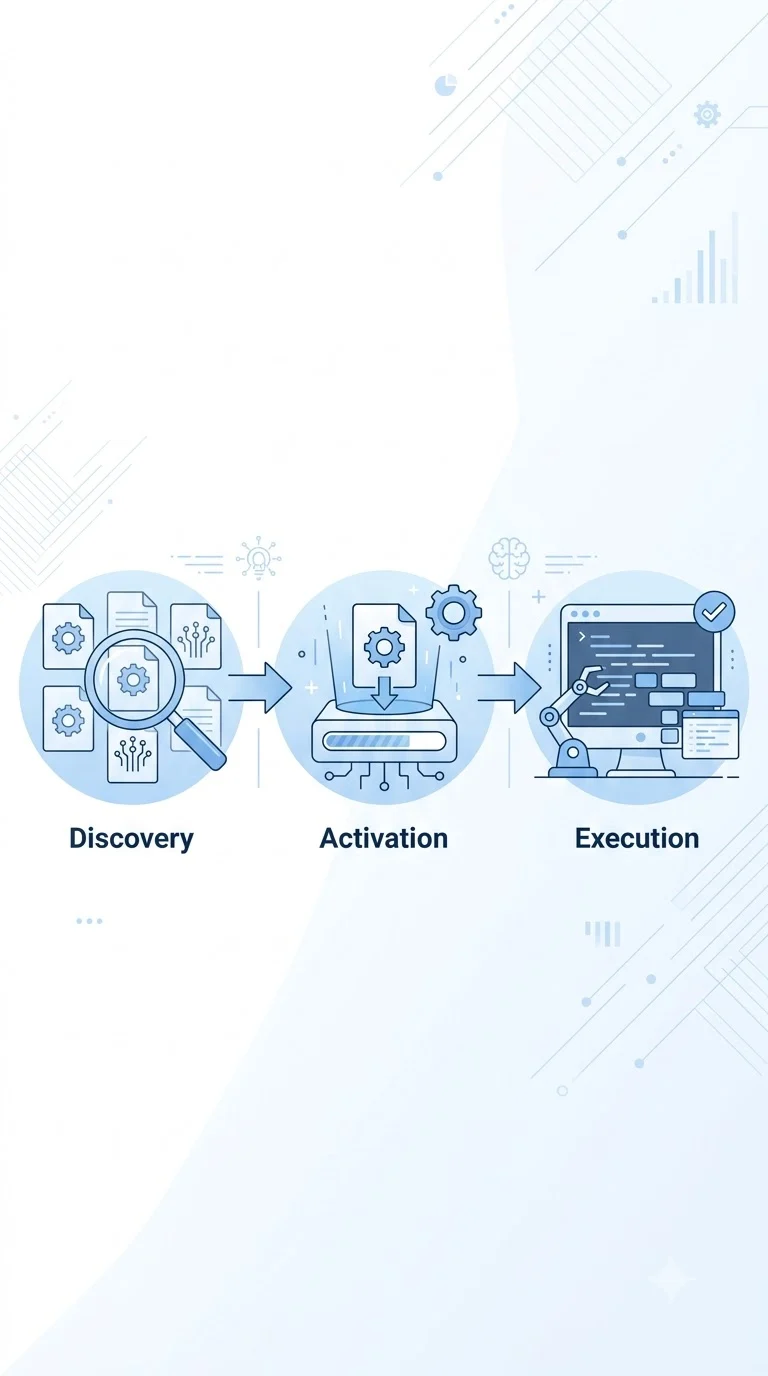
Both Claude Code and Antigravity describe the same basic three-step process:
- Discovery , when you start a session, the agent sees a short list of available skills (just their names and descriptions, not the full content)
- Activation , if your request looks related to one of those descriptions, the agent reads the full SKILL.md file
- Execution , the agent follows those instructions while doing the task
This “load only when needed” design is what makes skills lighter than pasting a giant set of instructions into every prompt , the agent isn’t carrying information it doesn’t need for the current task. The catch is that this whole process depends on the agent actually finding the skill folder in the first place. That’s where the two tools start to diverge.
3. Where Claude Code Looks for Skills
Claude Code keeps this simple. There are two locations:
| Scope | Folder |
|---|---|
| Personal (all projects) | ~/.claude/skills/ |
| Project-specific | .claude/skills/ |
Drop a properly formatted skill folder in either location and Claude Code discovers it automatically at startup. There’s no separate CLI-versus-app distinction to worry about , it’s one consistent behavior.
4. Where Antigravity Looks for Skills (and Why It Gets Messy)
Antigravity isn’t one product , it’s three: the main Antigravity app, Antigravity IDE, and Antigravity CLI. Each of these has, at various points, checked slightly different folders for skills, and Google’s own documentation on this has lagged behind what the software actually does. One developer who tested this directly , checking four commonly cited folder locations against all three Antigravity variants , found that only one location was reliably recognized by all three: ~/.gemini/config/skills/. Other commonly recommended paths, like ~/.gemini/antigravity/skills/ or .agents/skills/, worked for some variants but not others, depending on which one you were running and how it was installed. On top of that, there’s a confirmed bug: when skills are installed globally and then symlinked into Antigravity’s expected folder (a common setup when you’re sharing skills across multiple tools), Antigravity IDE silently ignores the symlinked ones. The files are valid, the content loads fine if you open them manually, and other tools like Claude Code have no problem following the same symlink , but Antigravity IDE’s skill list simply doesn’t include them. It’s not that the instructions get read and ignored; the agent never sees them as an option in the first place.
5. Two Different Problems: “Not Found” vs. “Not Followed”
This is the distinction that gets lost in most discussions about skills not working, so it’s worth being precise about it. There are two separate failure modes, and they need different fixes:
- The skill was never discovered. This is a folder/path problem , the agent’s discovery step never found your SKILL.md file, so it was never even a candidate. This is what’s happening in the documented Antigravity path and symlink issues above.
- The skill was found but not followed closely. This is a different issue entirely , the agent saw the instructions and made a judgment call to deviate from them anyway. This shows up more as a model-behavior complaint than a configuration bug, and it’s harder to pin down with a clean before-and-after test.
The documented evidence , the GitHub bug report, the folder-path testing , points clearly at the first problem in Antigravity. The second, “the model just doesn’t follow it as reliably,” is something individual developers report anecdotally more often about Gemini-based tools, but it’s not something that’s been rigorously tested the way the folder-discovery issue has. Worth keeping in mind before you assume a skill “isn’t working” , check discovery first, because that’s the more common and more fixable cause.
6. Why the Model Underneath Also Matters
There’s a technical wrinkle specific to Antigravity worth knowing: because it can run tasks through different underlying models, a skill you write might end up executed by a Gemini model rather than a Claude model, even if you originally tested it with one and assumed the other. Skill authors working across tools are increasingly advised to keep instructions model-agnostic , avoid writing steps that assume a specific model’s exact output format, token limits, or reasoning habits. A skill written with Claude-specific assumptions baked in may behave differently once Antigravity routes the task elsewhere.
7. A Quick Checklist Before You Blame the Skill
If a skill doesn’t seem to be working, work through this in order rather than rewriting the whole file:
- Confirm the folder structure is right , a directory containing a SKILL.md file with proper YAML frontmatter (name and description fields at minimum).
- Double-check the path for the specific tool and variant you’re using , don’t assume the Antigravity IDE path and the Antigravity CLI path are the same.
- Ask the agent directly: “What skills are available to you right now?” This is a built-in sanity check both Claude Code and Antigravity support, and it tells you immediately whether discovery worked before you waste time debugging the instructions themselves.
- If you’re using symlinks in Antigravity IDE, be aware of the known bug , copying the skill folder directly, instead of symlinking it, is the current workaround.
- If the skill is discovered but not being followed well, mention it by name explicitly in your prompt rather than relying on automatic matching , this removes any ambiguity about whether the description field triggered correctly.
Bottom Line
SKILL.md isn’t a Claude-only trick anymore , it’s a shared standard, and Antigravity genuinely supports it. But “supports it” and “reliably finds it” aren’t the same thing yet. Claude Code’s two-folder setup is straightforward and well-documented. Antigravity’s three-product structure means the same skill that works perfectly in one Antigravity variant might be invisible in another, and the fastest way to know which situation you’re in is to just ask the agent what it sees , before you start second-guessing your SKILL.md content.