Vipin PG
In today’s fast-paced digital world, the demand for remote connectivity and collaboration has never been greater. As businesses expand across geographical boundaries and individuals seek flexible work arrangements, having a reliable and efficient remote desktop tool becomes paramount. Enter NoMachine, a powerful and cutting-edge solution that promises to redefine how we access and interact with our computers remotely.
In this article, we delve into the realm of remote desktop solutions, exploring the features and functionalities of NoMachine and evaluating its effectiveness in catering to the diverse needs of users. From seamless file sharing and remote access to enhanced security measures, NoMachine aims to deliver an unparalleled remote computing experience that bridges the gap between physical and virtual workspaces.
What is NoMachine?
NoMachine is a software application that provides advanced remote desktop capabilities, enabling users to access and control their computers remotely. It essentially allows you to connect to your computer from another device, such as a laptop, tablet, or smartphone, and interact with your desktop as if sitting in front of it.
NoMachine uses its proprietary NX technology to deliver a fast and reliable remote desktop experience. It is ideal for various use cases, including remote work, technical support, collaboration, and access to files and applications from afar. It supports multiple major operating systems, including Windows, Linux, macOS, iOS, and Android, allowing users to connect seamlessly across different devices and platforms.
The software provides various features to enhance the remote desktop experience, such as file transfer capabilities, session recording for later review, and video and audio streaming for real-time communication. Additionally, NoMachine emphasizes security to protect users’ data during remote sessions.
Pros
- Perpetually free for personal use, providing cost-effective access to remote desktop capabilities.
- Abundant and versatile features catering to the diverse requirements of users across various domains.
- Swift connectivity with minimal lag, ensuring a seamless remote desktop experience.
- Convenient session recording feature, enabling users to capture and review remote sessions for future reference.
- Effortlessly facilitates audio or video streaming from a remote desktop, enhancing real-time communication and collaboration.
Cons
- Limited compatibility with mobile devices, potentially restricting access and functionality for users on smartphones and tablets.
- May pose a significant learning curve, making it challenging for some users to harness its features and capabilities fully.
NoMachine: Features
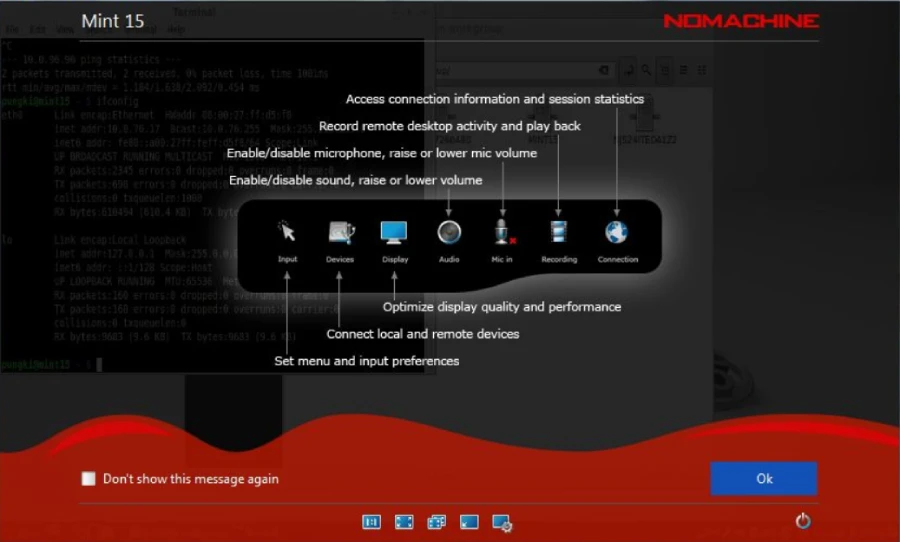
NoMachine boasts an impressive array of powerful features tailored to cater to diverse users. Its offerings include the capability to seamlessly access standard screen sharing and remote access features. Additionally, the software allows the smooth transfer of files between connected devices, enabling users to work remotely with any content imaginable. For instance, one could easily connect to their desktop from a tablet and easily access video files stored on the computer’s hard drive.
With a paid NoMachine subscription, the features available will depend on your specific plan. However, these features are generally designed to cater to businesses of all sizes, empowering them to manage and control their IT systems efficiently.
The offerings encompass highly specialized tools, allowing seamless large-scale connections and the capacity to link thousands of diverse devices if needed. NoMachine’s subscription plans are thoughtfully crafted to meet the unique requirements of various enterprises, unlocking a world of possibilities in IT system management and connectivity.
Pricing of NoMachine
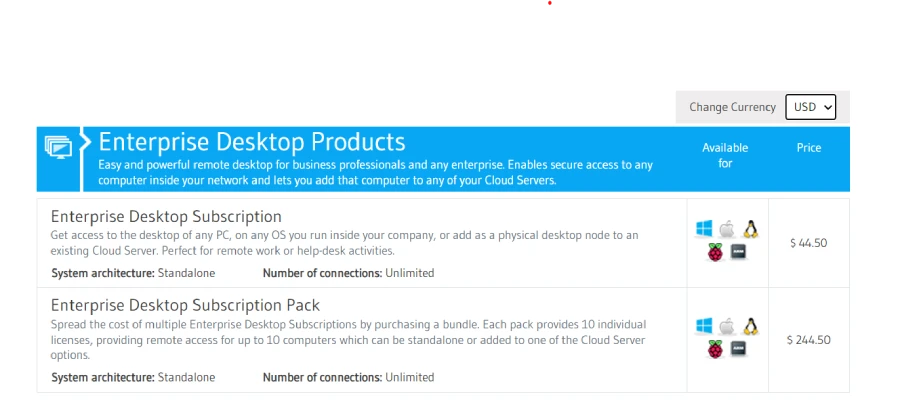
NoMachine provides a perpetual free option, “NoMachine for Everybody,” catering to non-commercial users. This free option requires no sign-up; you only need to download and install the software to get started. While the free version allows you to accomplish certain business-related tasks, such as accessing business files from your personal computer, it is not intended for direct commercial use.
NoMachine offers a diverse range of robust business and enterprise-level solutions for commercial clients. These specialized options are not free, and their pricing varies significantly, starting from $44.50 and ranging up to tens of thousands of dollars per year. To find the ideal package that suits your business needs, you should engage with the NoMachine team, who can guide you through the selection process and ensure you acquire the most fitting solution for your requirements.
Security of NoMachine
NoMachine goes above and beyond to safeguard its users and their data with a comprehensive suite of security features. All communications are fortified using SSL certificates, ensuring robust protection against data breaches. To further fortify the system, new connections are configured behind firewalls and NAT routers, adding an extra layer of security. Users can also opt for two-factor authentication, reducing the risk of unauthorized account access.
Moreover, NoMachine empowers users to protect sensitive information on remote devices by blanking their screens, preventing prying eyes from accessing confidential data. With an arsenal of security measures at your disposal, NoMachine offers a reassuring level of protection for your account and data, instilling confidence in the privacy and integrity of your remote desktop sessions.
Conclusion
In conclusion, NoMachine stands as a powerful and advanced remote desktop tool that offers an array of impressive features and functionalities. With its proprietary NX technology, the software ensures high-speed and reliable connectivity, bridging the gap between physical and virtual workspaces. Supporting all major operating systems, NoMachine allows users to access their computers remotely from various devices, promoting flexibility and efficiency.
For non-commercial users, the “NoMachine for Everybody” option offers free access to the software without any signup requirements, making it an attractive choice for individual use. However, businesses seeking comprehensive solutions can explore NoMachine’s paid plans, tailored to meet the specific needs of enterprises of all sizes.
With its continuous commitment to enhancing remote desktop experiences, NoMachine has the potential to shape the future of remote connectivity, enabling users to break free from the constraints of physical boundaries and embrace a more connected and collaborative digital world. Whether you are an individual seeking remote access to your desktop or a business striving for efficient IT system management, NoMachine offers a valuable solution worthy of exploration.