Hoverwatch is a unique spyware application. Since Spyware apps have become popular, the name Hoverwatch has been going around. Its broad monitoring and tracking capabilities for cell phones and computers are gaining popularity amongst users. It is known for focusing on capturing screenshots at regular intervals, a new feature amongst spyware tools.
Hoverwatch has been a great tool in providing detailed insights into the target person's activities. As well as it is ideal spyware for Android phones and Windows/Mac computers. It currently does not support monitoring iPhones but may do that in the near future.
Our lives have changed significantly as a result of the current digital era. The rise of the internet has brought safety concerns, especially for parents and employers. It is where Hoverwatch enters the chart with its powerful monitoring and controlling capabilities.
This incredible app claims to keep an eye on every online behavior to promote responsible and safe internet usage. But is Hoverwatch Worth it? Does Hoverwatch Actually Works?
Join us in this article as we get into a detailed review of Hoverwatch. The article will explore Hoverwatch, its features, usage, reliability, value, and overall worth. Since the market is flooded with numerous monitoring and spying apps, this review will help you choose a reliable one. Let's get started.
 Step 2: Once you have successfully signed in, choose and pay for a subscription plan.
Step 3: Now, from the left section of the dashboard, click on Add Device and select Android.
Step 4: Next, under the Android tab, click the link below the Download App option. Once done, tap open the Hoverwatch APK download for Android and complete the installation process.
Step 2: Once you have successfully signed in, choose and pay for a subscription plan.
Step 3: Now, from the left section of the dashboard, click on Add Device and select Android.
Step 4: Next, under the Android tab, click the link below the Download App option. Once done, tap open the Hoverwatch APK download for Android and complete the installation process.
Hoverwatch - An Introduction
Hoverwatch is a spyware application and a hidden tracking tool. It is an Android spy app that enables comprehensive monitoring and tracking of smartphones and other Android devices. Hoverwatch excels as it captures screenshots regularly and offers detailed insights into what the target device is doing. Currently, Hoverwatch supports Android smartphones as well as Windows and Mac computers. However, it doesn't monitor iPhones. Hoverwatch is a potent and useful tool for parents who want to keep a responsible check on their kids' internet usage. In another case, it is ideal for an employer concerned about how employees use business systems during office time. Hoverwatch has earned quite a sizeable market and a considerable user base.Hoverwatch Features
Hoverwatch doesn't have a huge list of features but some reliable features. Here are some of the notable among them:- Complete Invisibility: The App remains completely hidden from the target device. It gives accurate information while remaining undetectable.
- Text Messages and Calls: The Hoverwatch tracks and records all incoming and outgoing calls. It even allows the operator to track and view SMS and MMS messages. The App also enables tracking MMS images from a personal account.
- Messenger Monitoring: Hoverwatch captures message data from WhatsApp, Telegram, Gmail, Facebook, Instagram, Snapchat, TikTok, etc.
- Geolocation Feature: Hoverwatch utilizes Wi-Fi signals, cell towers, and GPS mobile tracker and tracks the target device's location.
- Front Camera Photo: Hoverwatch automatically takes photos using the front camera whenever the target device unlocks the screen.
- SIM Card Replacement: Hoverwatch sends a notification to the user when the target device changes SIM. It also tracks the device.
- Track up to 5 Devices: Hoverwatch can track up to 5 devices through its parental control feature. It can simultaneously track smartphones, personal computers, and laptops.
- Internet History, Gallery & Apps: Hoverwatch views photos and videos from the target device gallery and also keeps track of web activity. It also monitors the list of installed apps.
- To-do List & Calendar Events: Hoverwatch tracks the To-do list and calendar events of the target device. It also enables insights into the user's calendar activities and schedule.
- Contacts: Hoverwatch tracks all the entries, including names, numbers, addresses, and emails from the target devices' address book.
- Android Screenshots: Hoverwatch periodically captures screenshots and enables information on how, when, and by whom the target device is used. This feature also provides insights on chats, web browsing, social media activities, and more.
- Snapchat Spy: Hoverwatch enables parental control over Snapchat activities. It monitors media data flow, including drawings, documents, videos, audio, and photos.
Hoverwatch Device Compatibility
For Android: Operating System 4.0 or higher. For macOS: 10.15 Catalina or higher.Hoverwatch Pricing
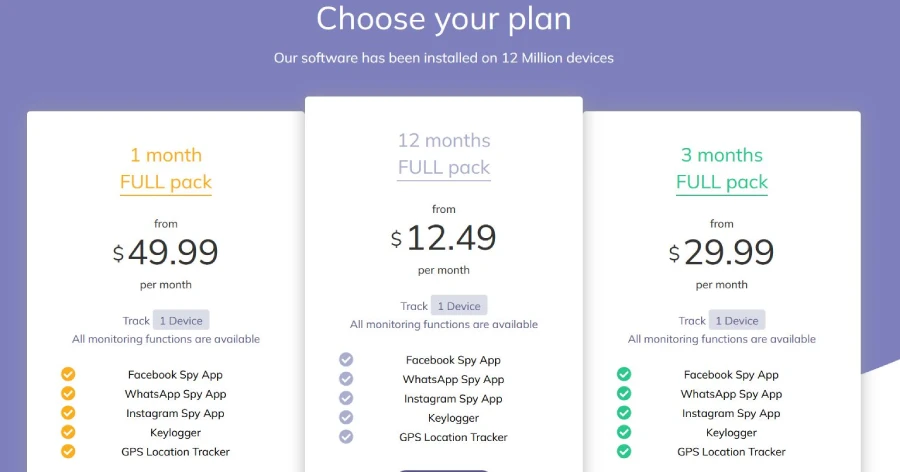
Hoverwatch is a paid spyware application. It comes with a 3-day free trial followed by different subscription plans. The subscription plans are classified depending on how many devices they can monitor. Here are more details about the same:
Personal package - Offering Tracking on 1 device only
- 1-month subscription: $24.95
- 3 months subscription: $59.95
- 12 months subscription: $99.95
Professional package – Track up to 5 devices
- 1-month subscription: $49.95
- 3 months subscription: $99.95
- 12 months subscription: $199.95
Business package – Track up to 25 devices
- 1-month subscription: $149.95
- 3 months subscription: $299.95
- 12 months subscription: $499.95
Hoverwatch Pros And Cons
Pros
- Capture call recordings with excellent sound quality.
- Easy installation and user-friendly interface.
- It doesn't require rooting the target Android device.
- Access to a large number of screenshots for a comprehensive view of activities.
- High data upload frequency.
- Convenient Android settings adjustment from the Hoverwatch dashboard.
Cons
- Lack of geo-fencing feature.
- Keylogger functionality is separate from the main App.
- Sometimes Inaccurate information regarding SIM card changes.
- Navigation within the App isn’t very smooth compared to other monitoring apps in the market.
How To Install Hoverwatch?
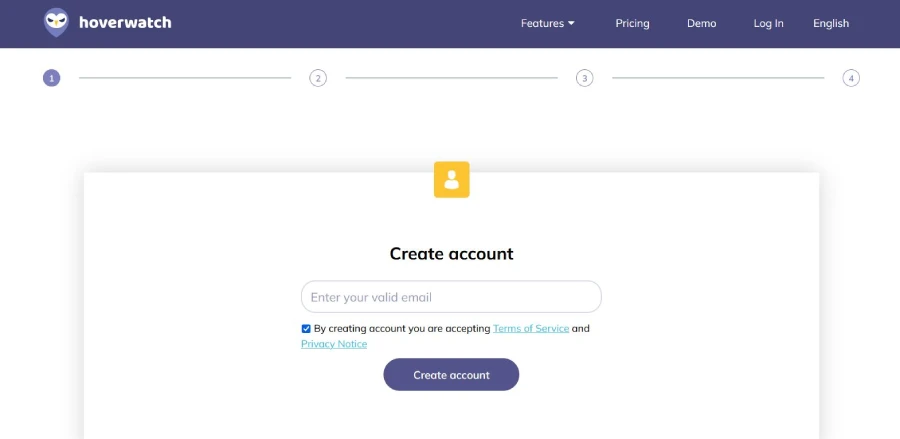
The correct installation of the Hoverwatch application is important for successful tracking. The process is easy, and here are all the steps for the same: Step 1: First, from any web browser, navigate to the official website of Hoverwatch, and on the top-right side of the screen, click Sign up Free. Here enter your Email address and form a secure Password. Tick the checkbox associated with the option 'I Agree to the Terms of Services and the Privacy Policy' and then click on the Sign up free tab given below.
Step 2: Once you have successfully signed in, choose and pay for a subscription plan.
Step 3: Now, from the left section of the dashboard, click on Add Device and select Android.
Step 4: Next, under the Android tab, click the link below the Download App option. Once done, tap open the Hoverwatch APK download for Android and complete the installation process.