AI video generators are revolutionizing content creation in 2025, making high-quality video production faster and more accessible. Unlike traditional video editing software, which requires manual effort and technical skills, AI-powered tools automate tasks like script generation, voiceovers, and scene transitions. Platforms like CapCut leverage AI to create professional videos with minimal input, helping marketers, influencers, and businesses produce engaging content effortlessly. From dynamic social media clips to full-length marketing videos, AI is reshaping the creative landscape. As demand for video content grows, AI video generators are proving to be a game-changer, offering efficiency, creativity, and cost savings like never before.
What are AI video generators, and how do they work?
AI video generators are advanced tools that use artificial intelligence to automate video creation, eliminating the need for traditional filming and editing. These platforms can transform text, images, and audio into engaging videos within minutes. By leveraging machine learning, deep learning, and text to speech technology, AI video generators create realistic voiceovers, animations, and seamless transitions without manual intervention.
The process typically involves:
- Input: Users provide text, images, or video clips.
- Processing: AI analyzes content, applies templates, and generates voiceovers using text-to-speech engines.
- Output: A fully edited video is produced, ready for download or sharing.
These tools are transforming video production by making it faster, cost-effective, and accessible to all.
The growing importance of AI in video content creation
- Increased demand for video content: With the rise of short-form content on platforms like TikTok, YouTube Shorts, and Instagram Reels, businesses and creators need fast, high-quality video production. AI video generators help meet this demand efficiently.
- Automation saves time and effort: AI-powered tools automate video editing, voiceovers, and even captions, reducing manual effort. Features like an AI caption generator ensure accurate subtitles, enhancing accessibility and engagement.
- Cost-effective video production: Hiring professional editors and voiceover artists can be expensive. AI video generators provide a budget-friendly alternative by automating tasks without compromising quality.
- Personalization and audience targeting: AI analyzes user behavior to create videos tailored to specific audiences. This ensures higher engagement and improved conversion rates for brands and marketers.
- Consistency across content platforms: AI-generated videos maintain branding consistency by using predefined templates, voiceovers, and styles, making it easier to scale content across multiple platforms.
- AI-powered creativity and innovation: Advanced AI features like automated scene transitions, voice cloning, and realistic avatars allow creators to experiment with new storytelling techniques, pushing the boundaries of video production.
Key benefits of AI video generators
- Time efficiency: Faster video creation compared to manual editing
AI video generators significantly reduce the time required for video production. Traditional editing involves hours of cutting, merging, and adding effects, whereas AI automates these tasks in minutes. Features like AI-powered transitions, scene suggestions, and auto-generated captions ensure seamless video creation with minimal effort. - Cost savings: Reducing the need for expensive production teams
Hiring videographers, editors, and voiceover artists can be costly, especially for small businesses and content creators. AI video generators eliminate the need for large production teams by automating editing, voiceovers, and animation. This allows businesses to create high-quality videos at a fraction of the cost. - User-friendly: Minimal skills required to generate professional videos
Unlike traditional video editing software, which requires expertise in tools like Adobe Premiere Pro or Final Cut Pro, AI video generators are designed for ease of use. With drag-and-drop interfaces, pre-made templates, and text-to-speech voiceovers, anyone can create professional videos without prior editing experience. - Scalability: Producing bulk content for marketing and social media
AI video generators enable businesses and influencers to scale their content production efficiently. Whether it’s creating hundreds of promotional videos, social media ads, or explainer videos, AI ensures quick and consistent output, saving time and effort while maintaining brand identity. - Personalization: AI-driven customization for targeted audiences
AI video tools analyze user preferences and behavior to create highly personalized content. Features like AI avatars, dynamic text, and automated voiceovers allow brands to tailor videos based on demographics, interests, and engagement patterns, increasing viewer retention and conversions.
How AI video generators are changing industries
- Marketing & advertising: AI-powered ads, product videos, and promotions
AI video generators help brands create high-quality advertisements quickly. Businesses can generate product demo videos, social media ads, and promotional clips using AI-driven templates and animations. Personalized marketing campaigns can also be scaled efficiently using AI-generated video content. - Social media & influencers: Quick content generation for TikTok, YouTube, etc.
Social media influencers rely on consistent video production to grow their audience. AI tools automate the process by generating engaging clips, adding effects, and even providing an AI caption generator for better accessibility. This allows creators to focus on storytelling rather than spending hours on editing. - E-learning & education: AI-generated tutorials and explainer videos
AI video generators are transforming online learning by creating interactive tutorials, explainer videos, and lecture summaries. AI-driven avatars, animations, and text-to-speech narration make learning materials more engaging and accessible for students worldwide. - Corporate & business use: Training videos and presentations
Businesses use AI-generated videos for employee training, onboarding, and internal communications. AI tools help create instructional videos, compliance training modules, and professional presentations without the need for expensive video production teams. - Entertainment & film: AI-assisted video editing and post-production
The entertainment industry is embracing AI for editing, visual effects, and even AI-generated scripts. AI-powered tools help filmmakers and content creators automate tasks like scene transitions, voice cloning, and CGI enhancements, making video production more efficient and cost-effective.
How to use CapCut video generator for creating content in 2025
CapCut Desktop Video Editor is an intuitive and powerful tool designed to help educators create engaging and informative educational videos. Follow this guide to get started.
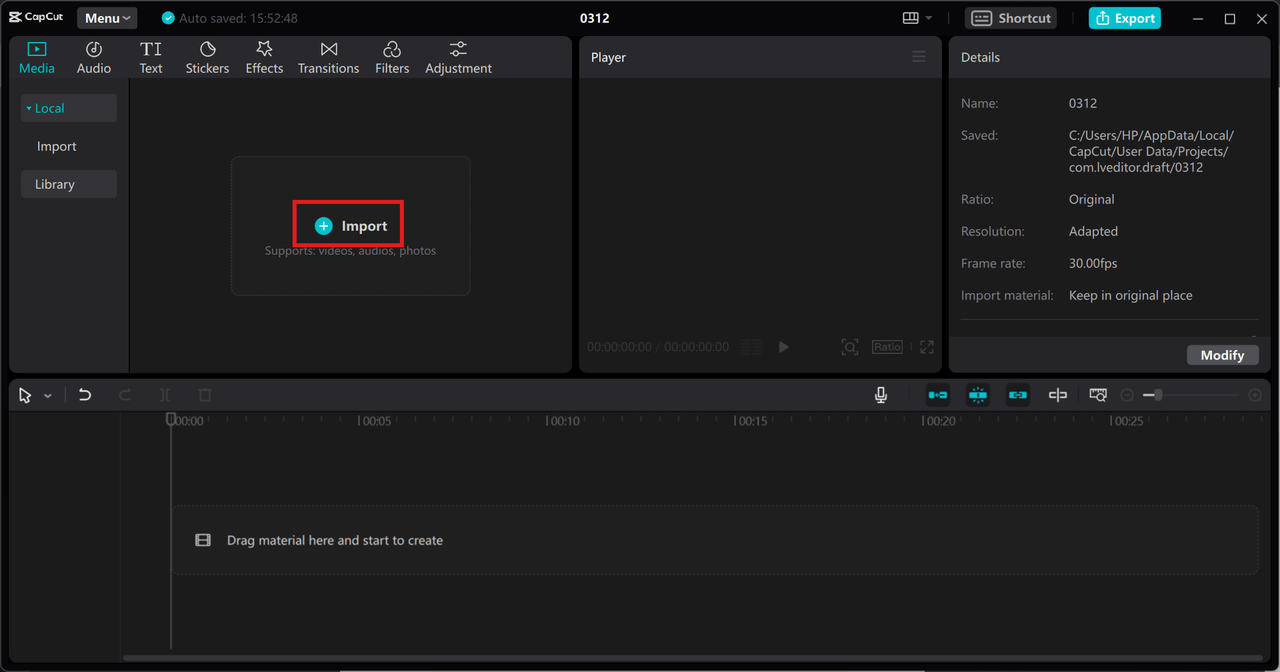
Step 1: Open CapCut and import your video
Begin by downloading and installing CapCut on your PC. Launch the application and start a new project by clicking “Create Project.” To add your video files, use the “Import” button or simply drag and drop them into the media library. Keeping CapCut updated ensures access to the latest features and tools.
Step 2: Enhance your video with text and effects
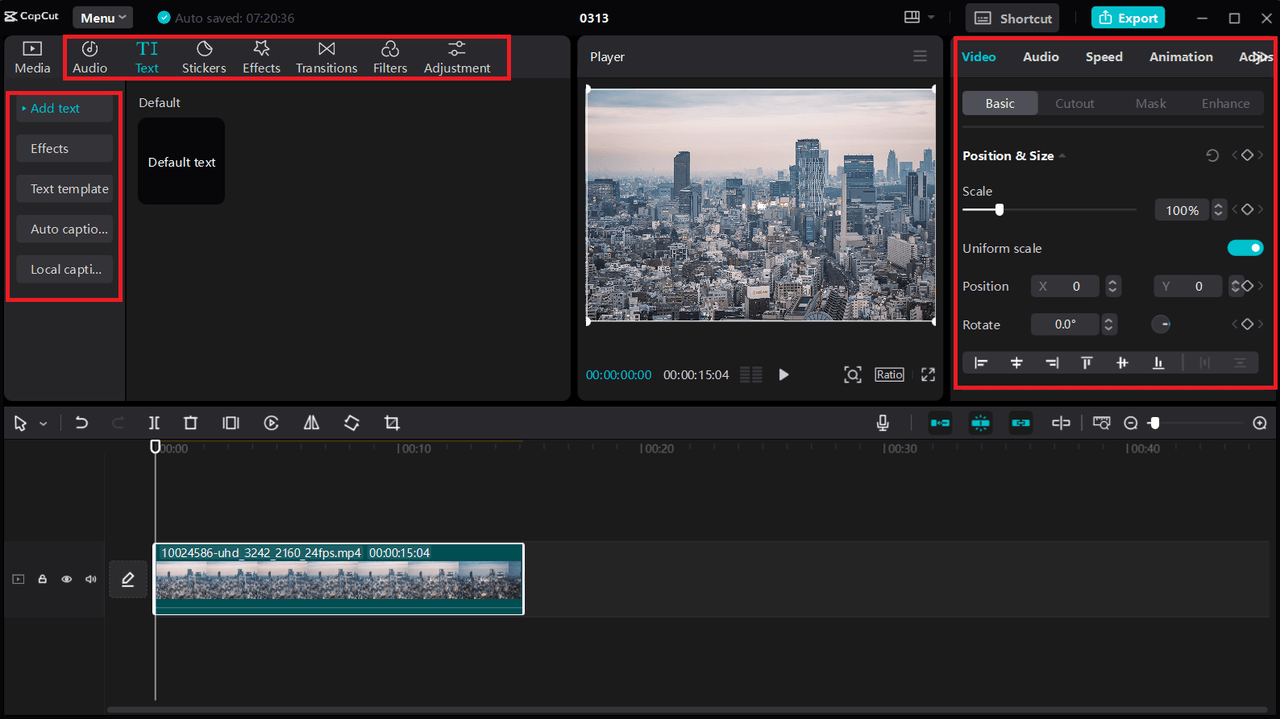
Once your video is uploaded, enhance it with various features to boost engagement. Use CapCut’s text tool to add captions, titles, or subtitles, making complex concepts easier to understand. Customize the font style, size, and color to match your educational theme, and apply animations for a more dynamic presentation. Additionally, you can enrich your video using CapCut’s collection of royalty-free music, sound effects, stickers, filters, and visual enhancements.
Step 3: Export and share your final video
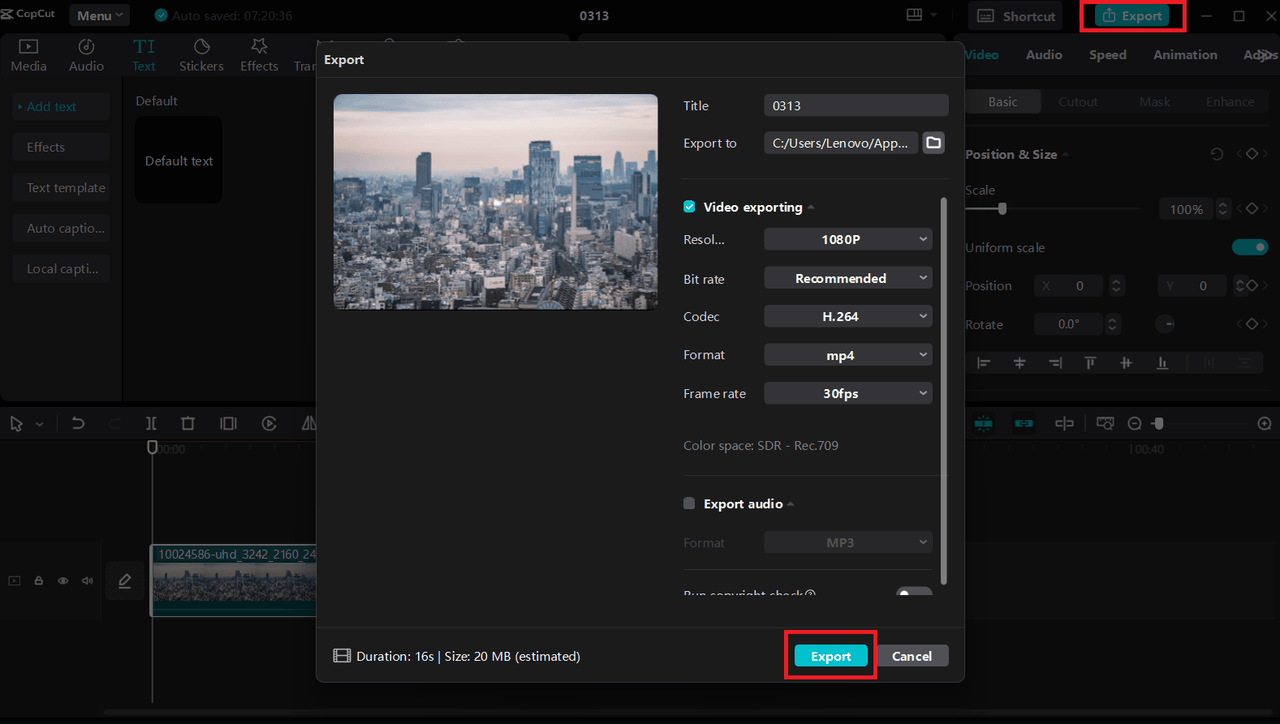
After completing your edits, click the “Export” button at the top right corner of the screen. Adjust the export settings to match your preferred resolution and format, then click “Export” again to save your video. Your educational content is now ready to be shared with students or uploaded to learning platforms.
Conclusion
AI video generators are revolutionizing content creation by making video production faster, cost-effective, and highly accessible. Tools like CapCut streamline editing, while AI-driven features such as text-to-speech and AI caption generators enhance engagement and personalization. From marketing and education to social media and entertainment, AI is reshaping industries by automating video creation at scale. While challenges like creativity limitations exist, the future of AI-powered video production promises even more innovation, enabling creators to produce high-quality content effortlessly.